This repo contains the code to run ml-runner - a python base server that allows users to run ML models on images on a dedicated machine. Simple to set up, and easy to implement new models.
The motivation behind this work is that certain models are really complicated to convert to torch script and sometimes not even feasibale. To allow Nuke users (and other software users) to take advantage of this models without having to hop into comfy ui.
FYI - this is an ongoing project I'm working on - and by no means a finished software. It saves me a lot of time to use this - but there is no exepectations at all for people to be using it given that its still very undevelopped.
After having followed the install instructions to install the server simply run the following code from inside the created virtual environment
python ml-runner.py --listen_dir /path/to/listen_dir
And the server will be listening on the given directory. Once the server is started, it'll keep going waiting until told otherwise. To stop it - simply press ctrl+c in the terminal (I know not great).
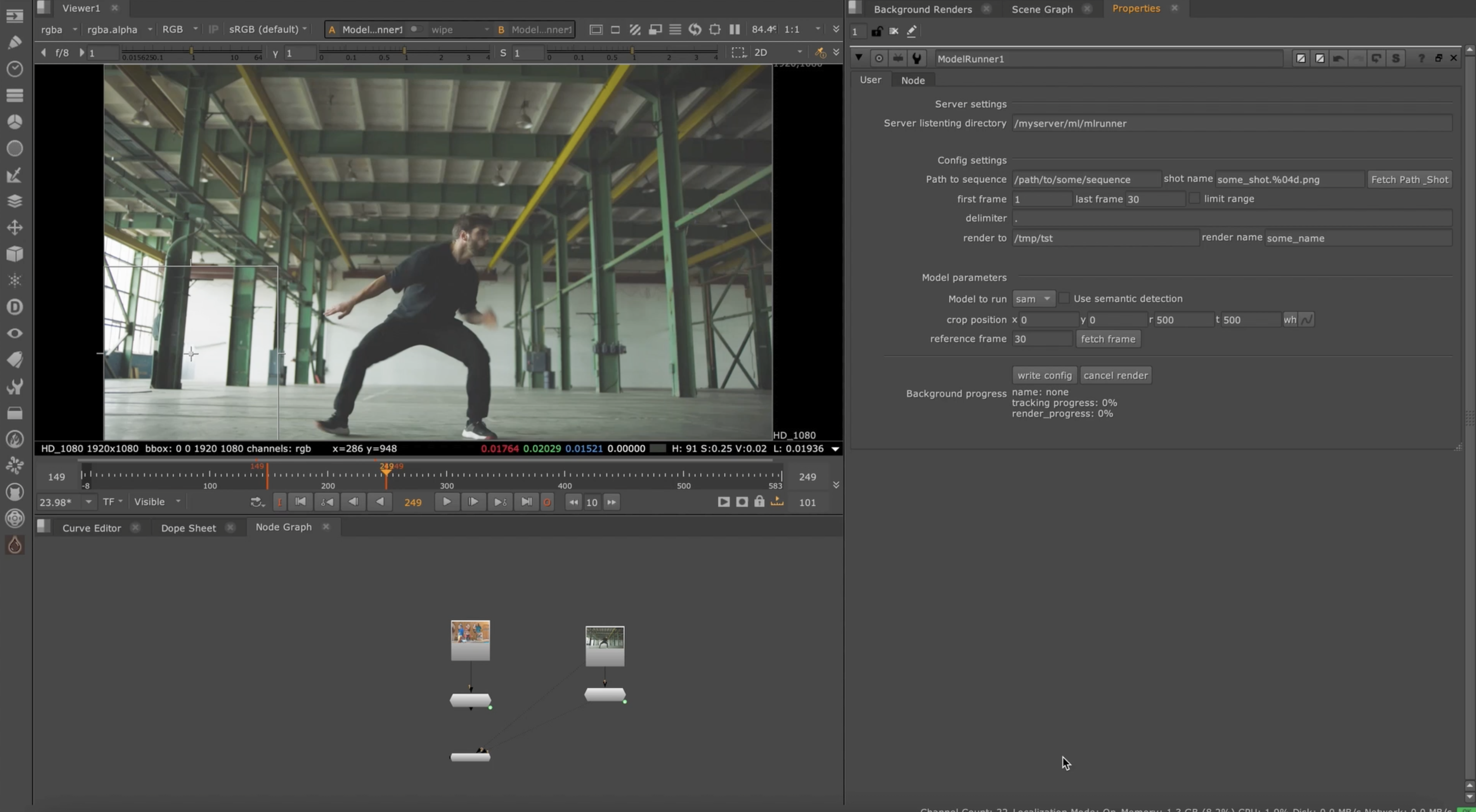
Once the server is running, you can send the configs to the listening directory from Nuke using the ModelRunner node. Obviously, the machine that is running the server MUST have access to the directories where the images you want to process/ render are - otherwise it will fail.
The config files right now are created from Nuke - however it can be implemented in any app, as long as they allow you to use python. Nuke gizmo is contained inside this repo under nuke/ToolSets/ML/ModelRunner.nk
To see how the nuke node works, simply click the below image or the link to video
Main features:
- EXR,PNG and MOV loading
- Limit range (if you want to process only parts of a sequence)
- Cancel/interrupt renders
- Load images back into Nuke
Implemented models:
- SAM2
- DAM4SAM
- Florence2 <- Disabled by default as it takes 2 minutes to activate when starting the server, if you want to use it enabled it in the server code.
- GroundindDINO
- DepthCrafter
- DepthAnything3
- RGB2X
- CoTracker3
Known issues:
- Image loading into Nuke is a bit hacky - it places them quite randomly in the script.
- If using GDINO/Florence - it only loads one of the created masks to nuke, instead of all the created masks
- Supports only EXR and PNG.
- Haven't implemented error reporting to Nuke
- Progress reporting to node UI is buggy - to see refresh you need to close reopen the node properties
The license of this repository only covers the ml-runner related code. All of the code/files in third-party-models come with the original model repository license. Please visit the original model repo to refer to the model licenses.
The server code has been tested with Linux Rocky 9 Python 3.10 PyTorch2.7 and CUDA12.8. However it should work with other CUDA versions and some other pytorch versions, depending on how far you go. The repo assumes that you have an NVIDIA GPU and that is good enough to run some models, that python3.10 is already installed, and that virtualenv is already installed.
Start by cloning the repository and creating a virtual environment
git clone https://github.com/lprestini/ml-runner.git
python3 -m virtualenv mlrunner_venv
. mlrunner_venv/bin/activate
Once the virtualenv enviornment is created and activated, we install pytorch & torchvision. If you want to install a different version of torch, you can find them here: link
pip install torch==2.7.1 torchvision==0.22.1 torchaudio==2.7.1 --index-url https://download.pytorch.org/whl/cu128
Now that torch is installed, lets installed the various python modules and download the checkpoints for SAM
pip install -r requirements.txt
cd third_party_models/edited_sam2/checkpoints/
./download_ckpts.sh
cd ../../../
The above will ensure that SAM2 and DAM4SAM are installed correctly.
Then add the following to your init.py
nuke.pluginAddPath('/path/to/ml-runner/ml-runner/nuke/')
Installing GroundingDINO (This is not required for the basic functionality. It's only used if you want to use semantic detection)
To install GroundindDINO, follow the instructions on their page here: https://github.com/IDEA-Research/GroundingDINO Or try follow these. If you follow the one on their repository MAKE SURE TO REMOVE TORCH & TORCHVISION from their pip requirements.
Check CUDA_HOME is set
echo $CUDA_HOME
If it's empty, then run the following
which nvccc
Take the output of that, and put it into CUDA_HOME
e.g my output is:
/usr/local/cuda-12.9/bin/nvcc
so my CUDA_HOME will be
export CUDA_HOME=/usr/local/cuda-12.9/
cd third_party_models
git clone https://github.com/IDEA-Research/GroundingDINO.git
cd GroundingDINO/
Now edit the requirements.txt file in GroundingDINO folder and remove the first two lines (torch and torchvision) Save and exit
pip install -e .
mkdir weights
cd weights
wget -q https://github.com/IDEA-Research/GroundingDINO/releases/download/v0.1.0-alpha/groundingdino_swint_ogc.pth
cd ..
If you have weird errors when doing pip install -e . try doing pip install .
This is a replacement repository for GDINO -
Make sure git lfs is installed
then do
git lfs install
git clone https://huggingface.co/microsoft/Florence-2-large
REMEMBER TO USE THIS YOU NEED TO ENABLE IT IN THE SERVER CODE
To install DepthCrafter please run the following comands. Please make sure git lfs is installed - otherwise you'll be downloading empty checkpoints.
cd third_party_models/depth_crafter
mkdir checkpoints
cd checkpoints
git lfs install
git clone https://huggingface.co/tencent/DepthCrafter
git clone https://huggingface.co/stabilityai/stable-video-diffusion-img2vid-xt
To install RGB2X please run the following commands Please make sure git lfs is installed - otherwise you'll be downloading empty checkpoints.
cd third_party_models/rgb2x/
mkdir checkpoints
cd checkpoints
git lfs install
git clone https://huggingface.co/zheng95z/rgb-to-x
To install Co-tracker3 please run the following commands Please make sure git lfs is installed - otherwise you'll be downloading empty checkpoints.
cd third_party_models/
git clone https://github.com/facebookresearch/co-tracker.git
cd co-tracker
mkdir cotracker3
cd cotracker3
wget https://huggingface.co/facebook/cotracker3/resolve/main/scaled_online.pth
To install DepthAnything3 you simply need to download the weights and move thme at the base of the depth-anything3 folder in third-party-models
cd third_party_models/depth_anything3/
git lfs install
git clone https://huggingface.co/depth-anything/DA3-GIANT
Important note, if you want to use other checkpoints other than the DA3-GIANT - you'll need to download the weights and edit the path in ml-runner/ml-runner/model_configs/depth_anything3.json to reflect what model you want to use.