sysknife is the command-line interface to the SysKnife daemon. It turns a
natural-language intent into a risk-labelled plan, asks for approval where
needed, and streams execution output in real time.
If you want SysKnife inside Claude Code / Cursor / Codex CLI instead, see
the main README and run npx sysknife-setup. Both paths
share the daemon, the audit chain, and the typed-action set.
# Check that the daemon is reachable
sysknife doctor

# Plan + execute a single intent
sysknife "check disk usage"

# Preview the plan without executing
sysknife --dry-run "list running containers"

# Open the interactive REPL
sysknifesysknife [GLOBAL FLAGS] [SUBCOMMAND | INTENT WORDS...]
When no subcommand is given and no intent words are provided, sysknife starts
an interactive REPL.
Plan and (optionally) execute a natural-language intent.
sysknife "check disk usage"
sysknife check disk usage            # words are joined — same result
sysknife "list running containers"
sysknife "is firewalld active?"
sysknife "layer vim via rpm-ostree"
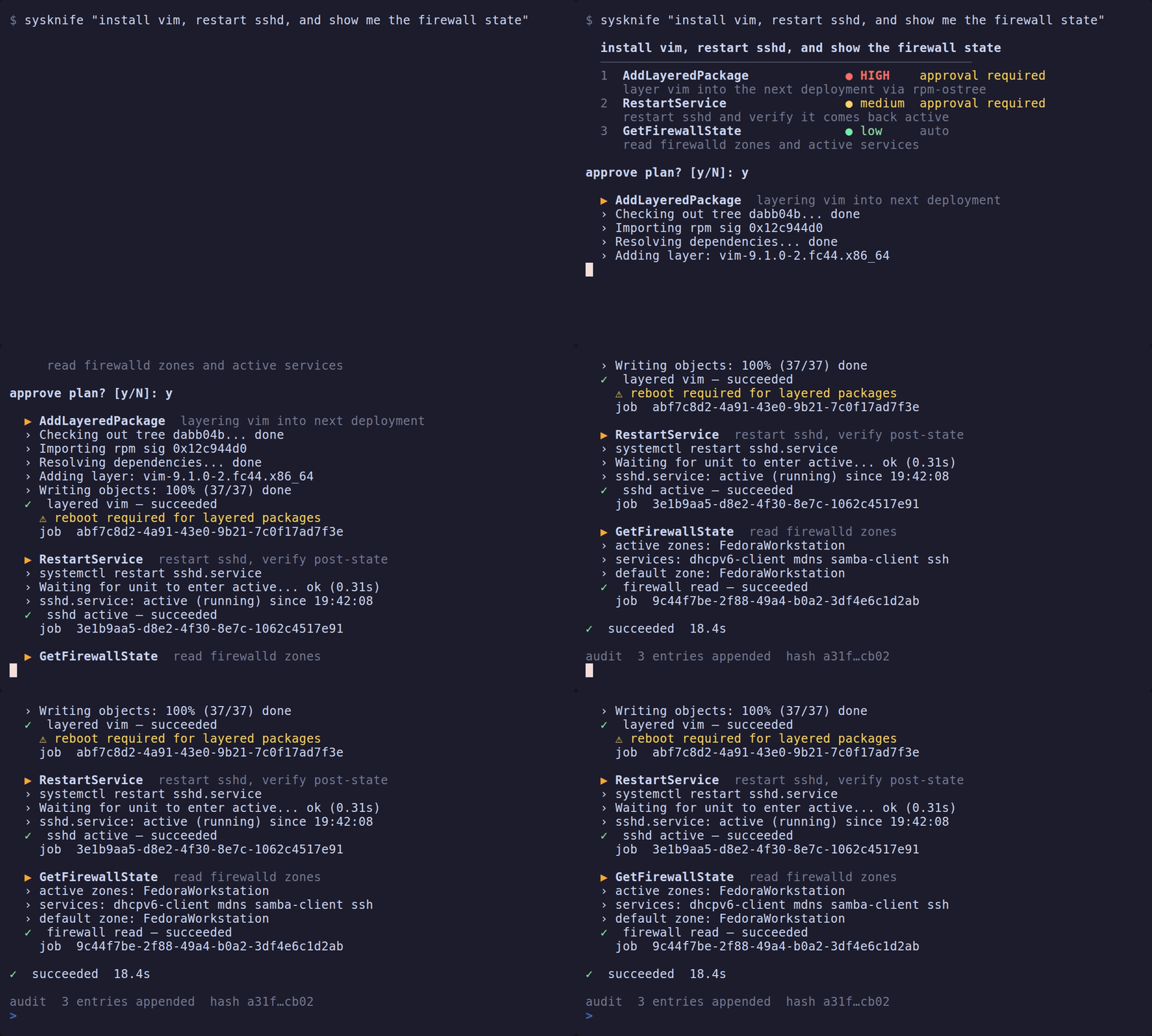
What happens:
- A spinner appears while the LLM plans (
Thinking…→Querying …→Proposing plan…). - The coloured plan is printed — each step shows a risk badge
(
● low/● medium/● HIGH), the action name, and a summary. - If any step requires approval, you are prompted. HIGH-risk steps always
require confirmation regardless of
--yes. - Execution streams output line by line with a
›prefix; a✓/✗result icon is printed after each step.
Check daemon connectivity and print the resolved configuration.
sysknife doctor
sysknife --json doctor      # machine-readable
Exit code 0 on success, non-zero if the daemon is unreachable.
Sample output:
✓  daemon ok
  socket    /run/sysknife/daemon.sock
  host      my-silverblue
  provider  anthropic
  model     claude-sonnet-4-6
Query past SysKnife execution history.
sysknife history
sysknife history --limit 50
sysknife history --status failed
sysknife history --action InstallPackages
sysknife history --since 2026-04-01T00:00:00Z
sysknife history --status succeeded --limit 5 --since 2026-04-10T00:00:00Z
Flags:
| Flag | Default | Description |
|---|---|---|
--limit N |
20 |
Maximum entries to return |
--status STATUS |
— | Filter by job status (succeeded, failed, canceled, …) |
--action ACTION |
— | Filter by action name (e.g. InstallPackages) |
--since DATETIME |
— | Only entries after this UTC RFC 3339 timestamp |
Issue a one-time receipt for a transaction returned by the MCP
sysknife_plan tool. This command requires an interactive terminal. It first
loads and displays the daemon-authoritative action, risk, summary, and proposed
change so an agent cannot substitute an opaque transaction ID. It mints the
receipt only after confirmation; high-risk approvals require typing the exact
action name.
sysknife approve 018f2c9d-...
sysknife --json approve 018f2c9d-...
Give the printed approval_receipt to the MCP client for that exact step. The
receipt expires after 15 minutes, is bound to the preview's action and params,
and is consumed on first execution. A chat message saying "approved" is not a
receipt.
Inspect and anchor the tamper-evident, Ed25519-signed audit chain the daemon writes for every executed action.
Verify the audit trail: the transaction chain, the approval-event chain, and
the binding between them. All three are reported and any one can fail the
command. Exits 0 if everything is intact, 1 if any check finds tampering,
2 if a check cannot run at all (missing key, unreadable database). When the
checks disagree the worst wins, and 1 outranks 2 — if something is provably
broken, "could not verify" would understate it.
With --json the report is an object with a top-level status plus a chain,
approval_events and binding section, so a pipeline can act on which part
failed.
sysknife audit verify
sysknife audit verify --json
sysknife audit verify --pubkey /etc/sysknife/audit-key.pub| Flag | Description |
|---|---|
--json |
Machine-readable JSON report instead of human text |
--pubkey FILE |
Verify with only the exported public key (<audit-key>.pub), no private key: the third-party / auditor path. Works with SQLite and PostgreSQL and proves the chain without signing access. |
Sign the current chain tip as a checkpoint and anchor it to an external append-only database, then verify all anchored checkpoints against the local chain. Anchoring the tip off-box is what makes tail-truncation and rewrite of the local chain detectable.
# credentials via env (preferred; keeps them off the command line)
SYSKNIFE_CHECKPOINT_DB=postgres://user@host/db sysknife audit checkpoint
# or explicitly
sysknife audit checkpoint --db postgres://user@host/db| Flag | Description |
|---|---|
--db URL |
Postgres URL of the append-only checkpoint database. Prefer SYSKNIFE_CHECKPOINT_DB so credentials are not exposed via ps / shell history. |
Each row is signed with Ed25519; verification uses the public key, so an auditor can verify without the ability to forge. See configuration for the key and checkpoint-DB env vars.
Print a shell completion script to stdout.
sysknife completions bash   >> ~/.bashrc
sysknife completions zsh    >> ~/.zshrc
sysknife completions fish   >> ~/.config/fish/completions/sysknife.fish
Supported shells: bash, zsh, fish, elvish, powershell.
Start an MCP (Model Context Protocol) server over stdio, so Claude Code, Claude Desktop, Cursor, Codex, and any other MCP-capable agent can drive SysKnife.
sysknife mcp-serverIt exposes five tools backed by the SysKnife daemon: sysknife_plan,
sysknife_execute, sysknife_history, sysknife_doctor, and
sysknife_audit_verify. Planning and execution stay behind the same approval
interlock as the CLI — sysknife_plan returns typed steps with daemon-issued
transaction IDs, and each step still requires an explicit
sysknife approve <transaction-id> in a real terminal before it can run.
Register it with your agent by pointing it at the binary, e.g. in
claude_desktop_config.json:
{ "mcpServers": { "sysknife": { "command": "sysknife", "args": ["mcp-server"] } } }npx sysknife-setup writes this configuration for the common clients
automatically.
sysknifeStarts an interactive session. Each line is treated as a natural-language intent and planned + executed in sequence.
Key bindings:
| Key | Action |
|---|---|
| ↑ / ↓ | Navigate command history |
| Ctrl+R | Reverse incremental history search |
| Ctrl+A / Ctrl+E | Jump to line start / end |
| Ctrl+W | Delete word before cursor |
| Ctrl+C | Cancel current line (does not exit) |
| Ctrl+D | Exit the REPL |
exit / quit |
Exit the REPL |
History is persisted to ~/.local/share/sysknife/history between sessions.
All flags apply to every subcommand and to free-form intents.
| Flag | Description |
|---|---|
--yes |
Auto-approve LOW-risk steps. With --max-risk medium, also approves MEDIUM. HIGH always requires human confirmation. |
--max-risk LEVEL |
Abort if the plan contains any step above this ceiling. Values: low, medium, high. |
--non-interactive |
Fail immediately (exit 1) if any step would require interactive approval. Use in scripts and CI. |
--dry-run |
Print the plan and exit without executing anything. |
--step-by-step |
Prompt for approval before each individual step instead of once for the whole plan. Each prompt comes after that step's daemon preview is printed. |
--json |
Emit NDJSON to stdout — one JSON object per event (plan, preview, result). All colour and spinner output is suppressed. Safe to pipe. |
--timeout SECS |
Hard wall-clock timeout in seconds. Aborts the whole operation if exceeded. |
--log-to FILE |
Tee all stdout output to FILE in addition to the terminal. Appends if the file exists. |
| Code | Meaning |
|---|---|
0 |
Success |
1 |
Plan or step refused — you rejected it, it exceeded the configured risk ceiling, or approval was required but the session is non-interactive |
2 |
Execution failed — the action ran but returned an error (also returned when --timeout expires) |
3 |
Planning failed — LLM error, provider unreachable, or the intent could not be turned into a plan |
4 |
Configuration or daemon error — invalid configuration, or the daemon could not be reached |
Subcommands with their own semantics (for example sysknife audit verify) pass
through their own exit code.
sysknife auto-detects between Anthropic and local Ollama from the presence of
ANTHROPIC_API_KEY. Every other provider must be selected explicitly with
SYSKNIFE_LLM_PROVIDER (and its matching API key set).
| Variable | Description |
|---|---|
SYSKNIFE_LLM_PROVIDER |
Force a provider: anthropic, openai, gemini, ollama, groq, deepseek, mistral, xai |
SYSKNIFE_LLM_MODEL |
Override the model name for the selected provider |
ANTHROPIC_API_KEY |
Use the Anthropic provider (default model: claude-sonnet-4-6) |
OPENAI_API_KEY |
Use the OpenAI provider (default model: gpt-4.1) |
GEMINI_API_KEY |
Use the Gemini provider (default model: gemini-2.0-flash) |
GROQ_API_KEY |
Use the Groq provider (default model: llama-3.3-70b-versatile) |
DEEPSEEK_API_KEY |
Use the DeepSeek provider (default model: deepseek-chat) |
MISTRAL_API_KEY |
Use the Mistral provider (default model: mistral-large-latest) |
XAI_API_KEY |
Use the xAI provider (default model: grok-3) |
SYSKNIFE_ANTHROPIC_URL |
Override the Anthropic base URL (default: https://api.anthropic.com) |
SYSKNIFE_OLLAMA_URL |
Override the Ollama base URL (default: http://localhost:11434) |
SYSKNIFE_BRAIN_MAX_TURNS |
Planning loop turn limit — integer ≥ 1 (default: 10) |
SYSKNIFE_OLLAMA_THINK |
Set true/false to override thinking-mode detection for Ollama models |
Auto-detection (when SYSKNIFE_LLM_PROVIDER is not set):
ANTHROPIC_API_KEYpresent and non-empty →anthropic- Otherwise →
ollama(must be running locally)
The other providers (openai, gemini, groq, deepseek, mistral, xai)
are not auto-detected from their API-key variables. To use one, set
SYSKNIFE_LLM_PROVIDER to its name and provide the matching key from the table
above.
| Variable | Description |
|---|---|
SYSKNIFE_SOCKET |
Daemon socket the CLI dials (unix://, vsock://, or a bare path). Falls back to the same resolution as SYSKNIFE_LISTEN_URI: $XDG_RUNTIME_DIR/sysknife/daemon.sock, then /tmp/sysknife-$UID.sock as a last resort. Production deployments set this via the systemd unit to /run/sysknife/daemon.sock. |
For non-interactive use (scripts, CI pipelines), combine --json,
--non-interactive, and --max-risk:
# Plan only — parse the JSON to inspect before executing
PLAN=$(sysknife --dry-run --json "check disk usage")
echo "$PLAN" | jq '.plan.steps[].action'

# Execute automatically up to medium risk; fail if anything higher appears
sysknife --yes --max-risk medium --non-interactive "list layered packages"

# Full pipeline with a timeout and log
sysknife --yes --max-risk low --non-interactive --timeout 60 \
     --log-to /var/log/sysknife/run.log \
     "check disk usage"
The --json output schema:
# Check if any services are failing
sysknife "which systemd services are failed?"

# See recent SysKnife activity
sysknife history --limit 10

# Dry-run a destructive action to inspect the plan
sysknife --dry-run "layer vim via rpm-ostree"

# Execute step-by-step with manual approval of each action
sysknife --step-by-step "update system"

# Non-interactive: fail fast if the plan needs a human
sysknife --non-interactive --max-risk low "check memory pressure"

# Get JSON output and parse with jq
sysknife --dry-run --json "list containers" | jq '.plan.steps[].action'

# Override the LLM for a single run
SYSKNIFE_LLM_PROVIDER=openai OPENAI_API_KEY=sk-... sysknife "check disk usage"

# Use a local Ollama model
SYSKNIFE_LLM_PROVIDER=ollama SYSKNIFE_LLM_MODEL=llama3.2:3b sysknife "list services"Run once per shell:
# bash (add to ~/.bashrc)
eval "$(sysknife completions bash)"

# zsh (add to ~/.zshrc)
eval "$(sysknife completions zsh)"

# fish
sysknife completions fish | source- Architecture overview — trust boundary between CLI, shell, and daemon
- Developer guide — building and testing locally
- User stories — end-to-end scenario descriptions