
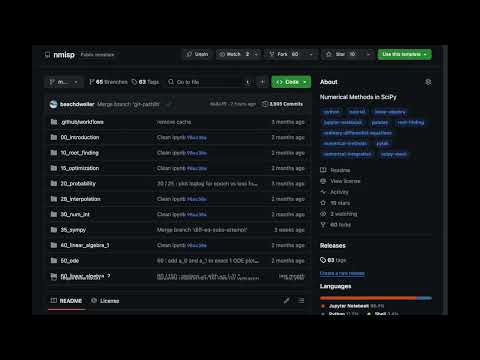
이 저장소는 다양한 수치 해법을 Python 언어와 그 확장 기능인 SciPy 를 이용하여 설명하고자 함.
This repository aims to describe various numerical methods in Python programming language and its extension SciPy.
flowchart TD
    A["00 Introduction<br>소개"]
    B["10 Root Finding<br>방정식의 근"]
    C["15 Optimization<br>최적화"]
    D["20 Probability & Statistics<br>확률과 통계"]
    E["28 Interpolation<br>보간법"]
    F["30 Numerical Integration<br>수치 적분"]
    G["35 SymPy<br>기호 연산"]
    H["40 Linear Algebra 1<br>선형대수 1"]
    I["50 ODE<br>상미분방정식"]
    J["60 Linear Algebra 2<br>선형대수 2"]

    A --> B
    A --> D
    A --> H
    B --> C
    B --> E
    E --> F
    F --> G
    F --> I
    H --> J
    H --> I
| 폴더 Folder |
주제 Topic |
주요 내용 Key Contents |
|---|---|---|
00_introduction |
소개 Introduction |
부동소수점, 파이썬 복습 Floating point, Python review |
10_root_finding |
방정식의 근 Root Finding |
순차, 이분법, 뉴턴-랩슨 Sequential, Bisection, Newton-Raphson |
15_optimization |
최적화 Optimization |
커브피팅, 분류, 선형계획 Curve fitting, Classification, LP |
20_probability |
확률 통계 Probability |
확률변수, 회귀, 판다스 Random variables, Regression, Pandas |
28_interpolation |
보간법 Interpolation |
보간법 Interpolation |
30_num_int |
수치 적분 Numerical Integration |
직사각형, 사다리꼴, 심프슨, 수렴 차수 Rectangle, Trapezoid, Simpson, Convergence order |
35_sympy |
기호 연산 SymPy |
기호 연산, 보 반력 Symbolic math, Beam reaction |
40_linear_algebra_1 |
선형대수 1 Linear Algebra 1 |
벡터, 내적, 외적, 행렬 Vectors, Dot/Cross product, Matrix |
50_ode |
상미분방정식 ODE |
오일러, 훈, 룽게-쿠타 Euler, Heun, Runge-Kutta |
60_linear_algebra_2 |
선형대수 2 Linear Algebra 2 |
연립방정식, 고유값, 가우스 소거 Systems of equations, Eigenvalues, Gauss elimination |
Google Colab 에서 실행하기
Running on Google Colab
- 이 저장소의
ipynb파일을 엶
Open anipynbfile of this repository 클릭
Click on런타임아래모두 실행시도
TryRun allunderRuntime

- 저장소의 분기 사본을 만듦
Fork the repository - 분기된 저장소에서
ipynb파일을 엶
Open theipynbfile from the forked repository
Click on- 파일을 수정
Make changes 파일메뉴 아래Github 에 사본 저장
ChooseSave a copy in GitHubunderFilemenu
git clone https://github.com/kangwonlee/nmisp
cd nmisp
conda env create -n nmisp -f ./tests/environment.2023.09.yml
conda activate nmisp
jupyter notebookconda activate nmisp
pytest -n auto tests/
- This software was initially supported by the Korea Ministry of Land, Infrastructure, and Transportation. It was also supported by the Korean Agency for Infrastructure Technology Advancement. (18TLRP-B117133-03)
이 소프트웨어는 대한민국 국토교통부 건설교통과학기술진흥원 교통물류연구사업의 지원을 받아 시작되었음. (18TLRP-B117133-03) - Also, this software got help from generative artificial intelligence : Google Gemini Advance and Anthropic Claude Opus 4.6 in improving the text and source code quality.
또한, 이 소프트웨어는 문장과 코드 품질 향상을 위해 생성형 인공지능 구글 제미니 어드밴스와 앤스로픽 클로드 오퍼스 4.6의 도움을 받았음.
수치 해석과 과학 계산 교육에 관한 외부 자료.
External resources on numerical methods and scientific-computing pedagogy.
- Wilson, G. et al. (2014). Best Practices for Scientific Computing. PLOS Biology.
- scipy-lecture-notes
- jpmorganchase/python-training