
console.log ging done right, beautifully.
You don't have to write the 13 char long console.log() anymore. Try:
lme.d("hello world");version 1.2.0 is out with more features and bug fixes. Update to get most out of
lme. See change log for more details.
- Simpler to use than
console.log()or evenconsole.log(chalk.red("hi")); - Draw lines with just a single function,
lme.line(). - Automatically expands
objectsandarrays. So that, you don't have to useJSON.stringify()anymore. - Clean and semantically focused.
- Actively maintained.
- Consistent design for errors, warnings, successes etc.
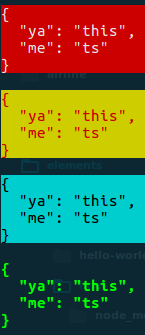


npm install --save lmelme.<status>(message);
const lme = require('lme');

lme.d("my kitty is pinky!"); // default style, used for anonymous outputs.
lme.e("Snap! something went wrong."); // used for logging errors.
lme.s("Oh yeah!"); // used for logging success.
lme.w("Attention! Thank you for your attention."); // used for logging warnings.

// lines
lme.line() // used to draw lines
lme.eline() // used to draw lines in error theme.
lme.sline() // used to draw lines in success theme.Syntax : lme.<status>(message);
- where
<status>can have the following values:
| status | name | when to use | example |
|---|---|---|---|
d |
default | default output | lme.d("hi"); |
s |
success | on success output | lme.s("hi"); |
e |
error | on error-ed output | lme.e("hi"); |
w |
warning | for warnings like output | lme.w("hi"); |
h |
highlight | for highlighting an output | lme.h("hi"); |
i |
info | for info like output | lme.i("hi"); |
t |
trace | for tracing stack | lme.t("hi"); |
where message can be string / float / int / objects. (note that javascript treats arrays as objects.)
Syntax : lme.line(character, length).
You can prefix d, s, e, w, h to the line() function to obtain the corresponding color scheme for your line. You can also simply use lme.line() which has some default values as described below.
| argument | type | purpose | default value |
|---|---|---|---|
character |
string |
determines which character should be used for drawing lines | - |
length |
integer |
length of the line | 30 |
lme.line();
lme.eline("^");
lme.sline("@", 12);
lme.wline("#", 50);| status | name | when to use | example |
|---|---|---|---|
line |
default | default output | lme.line(); |
dline |
same as line | default output | lme.dline("*", 5); |
sline |
successe | on success output | lme.sline("*"); |
eline |
error | on error-ed output | lme.eline("/", 50); |
wline |
warning | for warnings like output | lme.wline("*"); |
hline |
highlight | for highlighting an output | lme.hline("*"); |
More configurations are on its way.
If you wish to file any feature/bugs, mention it on issues.
Enjoy.
- v1.2.0
- Adds support for
trace. - Adds support for
info. (thanks @amandeepmittal) - Bug fixes
line()functions now support older versions of node.- Changed some colors for better accessibility on Windows and Linux machines.
- Fixed some minor quirks.
- Adds support for
- v1.1.3
- bug fixes
- docs update
- v1.1.2
- bug fixes
- docs update
- v1.1.1
- bug fixes
- docs update
- v1.1.0
- adds support for drawing lines
- docs update
- versions < 1.1.0
- adds support for semantic outputs.
- bug fixes
- doc updates
MIT © Vajahath Ahmed