


Deep-link tooling for React Native: inspect your app's route table, validate universal links (AASA) and Android App Links (assetlinks.json), open links on simulators and devices, debug matches live, and generate TypeScript types for your deep links.
Full documentation lives at vengalath.com/npm/react-native-deeplink-devtools.
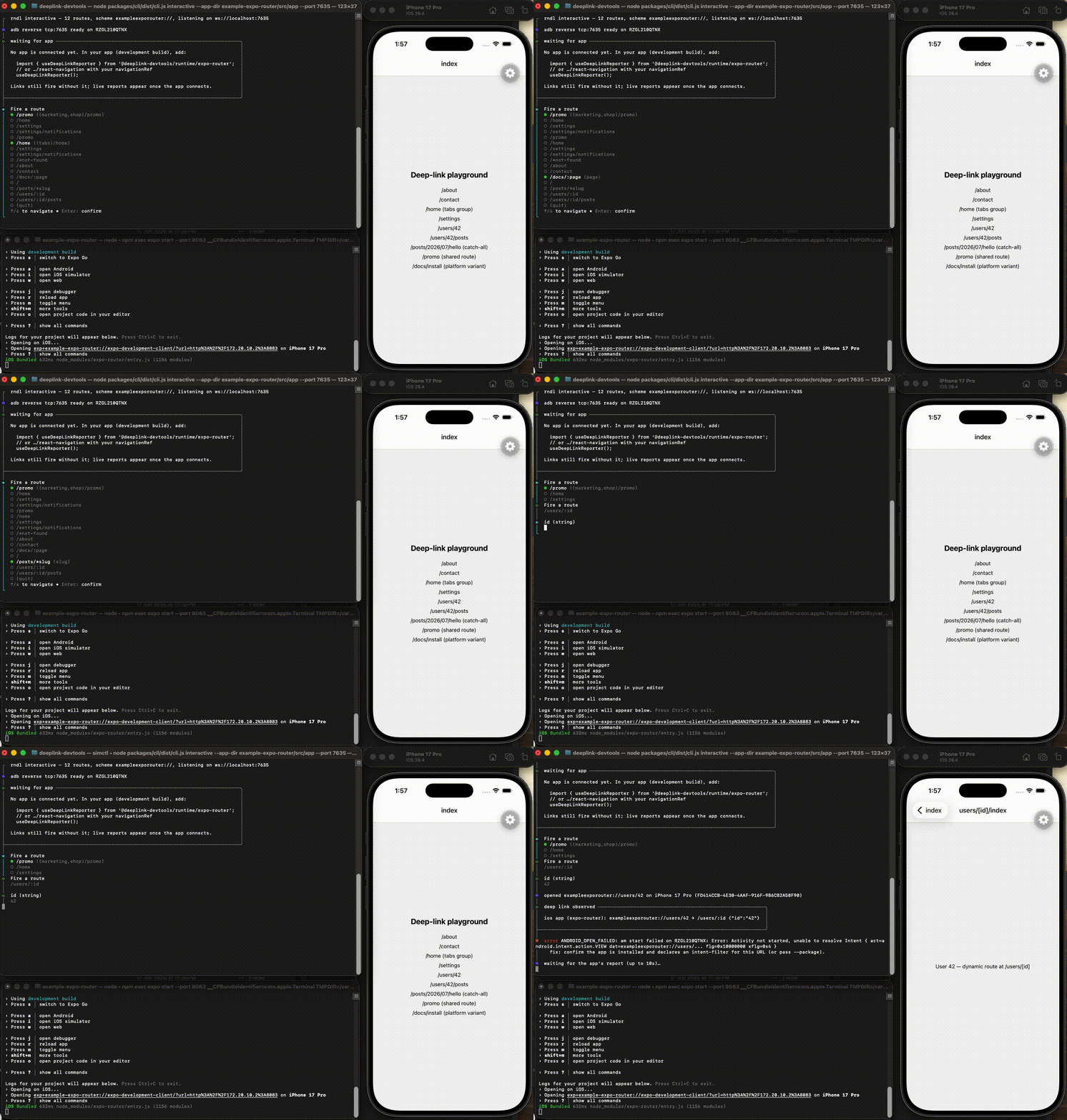
Deep linking is one of the most error-prone parts of a React Native app, and the failures are
silent: a universal link that opens Safari instead of your app, an AASA file behind a redirect,
an assetlinks.json with the wrong fingerprint, a route that no applinks component covers. None
of that shows up until a user taps a link in production. rndl turns those footguns into a check
you run locally and in CI, so you never ship a broken link again.
npm install --save-dev react-native-deeplink-devtools
# or run one-off without installing:
npx react-native-deeplink-devtools routes
Requires Node >= 22. Installed, the binary is rndl:
rndl routes                          # aligned table of every deep-linkable route
rndl validate --domain example.com   # check AASA + assetlinks.json, exit 1 on errors
rndl open '/users/:id' --params id=42 # build the URL and open it on a running device
rndl interactive                     # pick a route, fire it, watch the live match
rndl typegen --out src/deeplinks.gen.ts # generate typed, tsc-checked deep-link helpers
In CI, the GitHub Action wraps rndl validate and rndl routes, annotates the
pull request inline, and uploads SARIF to code scanning.
Prints the deep-linkable route table. Auto-detects app/ then src/app/ for Expo Router, or
point --config at a React Navigation linking module.
rndl routes --json                                  # routes, API routes, layouts, diagnostics
rndl routes --app-dir src/app                        # explicit Expo Router directory
rndl routes --config src/navigation/linking.ts       # default or `linking` export
rndl routes --config src/navigation/linking.ts#named # a specific named export
rndl routes --config src/navigation/linking.ts --dotenv # module imports from '@env'
For Expo Router it understands every file convention (dynamic segments, catch-alls, groups
including array syntax, platform-specific variants, +not-found, +api, +html,
+native-intent, +middleware) and warns, never crashes, on conventions it does not recognize.
For React Navigation it executes the linking module under Node (TypeScript and ESM are handled for
you), so keep the linking config in an isolated module that only exports plain data and
parse/stringify functions. If the module imports from '@env' (react-native-dotenv), pass
--dotenv [path] (default .env) and rndl serves the dotenv values as that module; the flag
exists on every command that accepts --config (routes, validate, open, interactive,
typegen). Nested paths, exact, alias, regex-constrained and optional
params, wildcards, and custom parse/stringify are all understood; params with a custom parse
are reported as unknown (custom parse).
Validates a domain's universal-link and Android App Links files against the checks Apple and Google actually enforce: HTTPS, no redirects, the 128KB AASA cap, JSON schema, and fingerprints.
rndl validate --domain example.com                 # AASA + assetlinks.json
rndl validate --domain example.com --json          # full result as JSON
rndl validate --domain example.com --sarif         # SARIF 2.1.0 for CI upload
rndl validate --domain example.com --package com.example.app --sha256 AA:BB:...
Run inside your app's directory and validate also cross-checks the route table (auto-detected
like rndl routes; override with --app-dir/--config, or skip with --no-cross-check): a route
no non-excluded AASA component covers is an error (AASA_MISSING_ROUTE), a component matching no
route is a warning (AASA_ORPHAN_PATTERN). Errors exit 1, so rndl validate in CI stops a broken
universal link from shipping. Notes call out Apple-CDN caching and the ?mode=developer
entitlement. See docs/troubleshooting.md for the top footguns and the
diagnostic code that catches each one.
Opens a deep link on a running simulator or device. Pass a full URL, or a route name/pattern that
rndl open fills in from your route table and app scheme.
rndl open exampleexporouter://users/42                      # a full URL, wherever a device runs
rndl open '/users/:id' --app-dir src/app --params id=42     # build the URL from an Expo Router route
rndl open HomeTabs/Feed/Article --config src/navigation/linking.ts --params slug=hi
rndl open https://example.com/users/42 --platform ios --device "iPhone 17 Pro"
With no --platform, open fires on every platform that has a device (a booted iOS simulator via
xcrun simctl, an adb device or emulator) and exits 0 if at least one opened; a platform with no
device is a note, not a failure. Naming --platform ios|android|both makes that platform required.
Route mode builds the URL from the route pattern and params (missing required params error before
any device is touched), taking the scheme from --scheme, the React Navigation prefixes, or your
app.json.
Debug deep links interactively: pick a route, fill in its params, fire it on a device, and see exactly what your app matched, side by side with what you fired.
rndl interactive                                    # auto-detects your app; fires wherever a device runs
rndl interactive --platform ios --scheme myapp      # target one platform / scheme explicitly
rndl interactive --config src/navigation/linking.ts # React Navigation linking module
Add the in-app reporter to your development build and rndl interactive shows the live match (the
route the router resolved and its params), highlighting any mismatch against what you fired:
// Expo Router: app/_layout.tsx
import { useDeepLinkReporter } from '@deeplink-devtools/runtime/expo-router';
useDeepLinkReporter();

// React Navigation: next to your NavigationContainer
import { useDeepLinkReporter } from '@deeplink-devtools/runtime/react-navigation';
useDeepLinkReporter({ navigationRef });
The reporter connects to the CLI over a localhost WebSocket (Android is tunneled with an automatic
adb reverse). It is dev-only and a guaranteed no-op in production: the implementation sits
behind React Native's __DEV__ flag, so Metro strips it from release bundles entirely, and a CI
assertion holds the production cost under 1KB.
Generate typed deep links from your route table, so a wrong route or param fails tsc instead of
shipping a broken link.
rndl typegen --out src/deeplinks.gen.ts --app-dir src/app                       # Expo Router
rndl typegen --out src/deeplinks.gen.ts --config src/navigation/linking.ts#linking # React Navigation
rndl typegen --out src/deeplinks.gen.ts --app-dir src/app --watch               # regenerate on change
The generated module gives you a compile-time-checked buildDeepLink and a typed useTypedParams
hook:
import { buildDeepLink, useTypedParams } from './deeplinks.gen';

const url = buildDeepLink('/users/[id]', { id: '42' }); // 'myapp://users/42', scheme baked in
const { id } = useTypedParams<'/users/[id]'>(); // typed for the route

buildDeepLink('/users/[id]', {}); // compile error: missing 'id'
Route keys are router-native (/users/[id] for Expo Router, /users/:id for React Navigation).
The generated file imports its small runtime from @deeplink-devtools/core, so add that as a
dependency of your app. React Navigation params with a custom parse function are typed unknown.
The CLI keeps runtime dependencies to a minimum: commander
(argument parsing, zero transitive dependencies), ws (the
dev-transport WebSocket server for interactive, zero transitive dependencies), and
@clack/prompts (the interactive TUI), plus this repo's
own packages. The React Navigation adapter uses jiti (zero
transitive dependencies) to execute TypeScript/ESM linking modules. validate uses Node's built-in
fetch, so there is no HTTP dependency. The runtime package ships no runtime dependencies of its
own; react, react-native, and expo-router are peer dependencies (the last optional).
| Area | Supported |
|---|---|
| React Native | >= 0.76, New Architecture (bridgeless) only |
| Platforms | iOS (simulator via simctl) and Android (device/emulator via adb) |
| Routers | Expo Router and React Navigation 7+ |
| Expo | Expo-compatible; example apps are Expo dev-client apps |
| Node (CLI) | >= 22 |
| Task | rndl | npx uri-scheme |
Manual (curl + editor) | Attribution SDKs (Branch, Adjust) |
|---|---|---|---|---|
| Print the app's deep-link route table | yes | no | no | no |
| Validate AASA / assetlinks.json in CI | yes | no | partial (by hand) | no |
| Cross-check routes against AASA | yes | no | no | no |
| Open a link on a device | yes | yes | yes (xcrun/adb) |
no |
| Live match debugging (fired vs matched) | yes | no | no | no |
Typed deep links (tsc-checked) |
yes | no | no | no |
| Attribution / marketing links | no | no | no | yes |
rndl is developer tooling for testing and validating the links your app already declares. It is
not an attribution platform, and it does not modify your linking configuration.
| Package | Purpose |
|---|---|
react-native-deeplink-devtools |
The rndl CLI: routes, validate, open, interactive, typegen |
@deeplink-devtools/core |
Route-table model, matchers, validators (pure TS, no RN deps) |
@deeplink-devtools/adapter-expo-router |
Builds a route table from an Expo Router app/ directory |
@deeplink-devtools/adapter-react-navigation |
Builds a route table from a React Navigation linking config |
@deeplink-devtools/runtime |
Tiny in-app reporter for live deep-link debugging (dev-only) |
@deeplink-devtools/typegen |
Generates typed route helpers from your route table |
Attribution/marketing links (Branch/Adjust territory), push-notification deep links, and modifying your app's linking configuration. The toolkit inspects and validates; it does not rewrite your app.
See CONTRIBUTING.md.