- Debounced pattern
useEffect- React Modal navigation
- Challenges on
useEffect - Use
data-attr in React - How To Debug React Apps Like A Senior Developer
- Perf in React
- What’s New in React 18
- React
forwardRef(): How to Pass Refs to Child Components - React Memory Leaks: How useCallback and closures can bite you
- Snappy UI Optimization with useDeferredValue
- memoization required
Rule #1 the debounced callback must be memorized
https://tanstack.com/pacer/latest/docs/framework/react/examples/debounce
const debouncedSetCount = useCallback(
  debounce(setDebouncedCount, {
    wait: 500,
  }),
  [], // 🚨🚨🚨 must be memoized to avoid re-creating the debouncer on every render (consider using useDebouncer instead in react)
)
Rule #2 use the debounced callback inside a state updater function
function increment() {
  // this pattern helps avoid common bugs with stale closures and state
  setInstantCount((c) => {
    const newInstantCount = c + 1;
    debouncedSetCount(newInstantCount) // debounced state update
    return newInstantCount // instant state update
  })
}
Rule #3 manage the instant value and debounced value separately
// For UI
const [instantCount, setInstantCount] = useState(0)

// For API call
const [debouncedCount, setDebouncedCount] = useState(0)https://react.gg/visualized#managing-effects
useEffect takes place after render, but useLayoutEffect takes place before render.
https://www.youtube.com/watch?v=42RKqciqjV0
https://reactnavigation.org/docs/stack-navigator/#presentation
https://react.dev/learn/synchronizing-with-effects#challenges
- for timer, it's necessary to clear it in cleanup function
- for fetching data, it's the best practice to set a explicit flag, like
ignore, to fix this type of problem. - When something can be calculated from the existing props or state, don’t put it in state. Instead, calculate it during rendering.
- the component state can be reset by offering a
keyprops - Update parent and children state in a single pass, but not
useEffect. React batches updates from different components together, so there will only be one render pass.
<Option data-name="data set name" />See more https://developer.mozilla.org/en-US/docs/Learn/HTML/Howto/Use_data_attributes
Adding a CSS Reset in CRA
https://create-react-app.dev/docs/adding-css-reset/
@import-normalize; /* bring in normalize.css styles */

/* rest of app styles */
https://youtu.be/l8knG0BPr-o?t=645


https://youtu.be/l8knG0BPr-o?t=786


https://dev.to/headwayio/react-optimize-components-with-react-memo-usememo-and-usecallback-39h8
Class Components
- PureComponent
- shouldComponentUpdate
Functional Components
- React.memo
- useMemo
- useCallback.
Heads up
const Header = React.memo(({ title }) => <h1>{title}</h1>, []);
export default Header;
The previous fashion will cause component to show up as Unknow in react dev tools. To fix this, wrap comp in memo after defining it, as following:
const Header = ({ title }) => <h1>{title}</h1>;
export default React.memo(Header);New Feature: Automatic Batching
| Before 18 | After 18 |
|---|---|
| React event handlers | promises |
| setTimeout | |
| native event handlers | |
| or any other event |
https://dmitripavlutin.com/react-forwardref/
https://react.dev/reference/react/useImperativeHandle
https://dmitripavlutin.com/react-forwardref/#53-anonymous-component
In React dev tools an anonymous function wrapped in forwardRef() results in a component with an unmeaningful name.
https://dmitripavlutin.com/react-forwardref/#6-forwardref-in-typescript
forwardRef<V, P>() accepts 2 argument types:
Vis the type of the value stored in a ref, which is usually anHTMLDivElementorHTMLInputElementPis the props type of the wrapped component
useRef<V>() hook in TypeScript has one argument type V: denoting the value type stored in the ref. If you store DOM elements in the ref, V can be HTMLDivElement or HTMLInputElement.
Now let's annotate the parent and child components:
import { useRef, forwardRef } from "react";

export function Parent() {
  const elementRef = useRef<HTMLDivElement>(null);

  return <Child ref={elementRef} />;
}

const Child = forwardRef<HTMLDivElement>(function (props, ref) {
  return <div ref={ref}>Hello, World!</div>;
});https://schiener.io/2024-03-03/react-closures
import { useState, useCallback } from "react";

class BigObject {
  public readonly data = new Uint8Array(1024 * 1024 * 10); // 10MB of data
}

function App() {
  const [count, setCount] = useState(0);
  const bigData = new BigObject();

  const handleEvent = useCallback(() => {
    setCount(count + 1);
  }, [count]);

  const handleClick = () => {
    console.log(bigData.data.length);
  };

  return (
    <div>
      <button onClick={handleClick} />
      <ExpensiveChildComponent2 onMyEvent={handleEvent} />
    </div>
  );
}
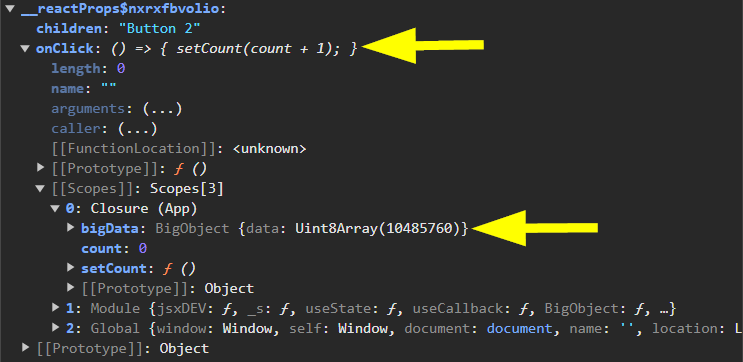
All closures share a common context object from the time they were created. Since handleClick() closes over bigData, bigData will be referenced by this context object. This means, bigData will never get garbage collected as long as handleEvent() is being referenced. This reference will hold until count changes and handleEvent() is recreated.
- https://www.joshwcomeau.com/react/use-deferred-value/
- https://react.dev/reference/react/useDeferredValue
- https://react.dev/blog/2024/04/25/react-19#use-deferred-value-initial-value
An important thing to note: useDeferredValue only works when the slow / low-priority component has been wrapped with React.memo():
import React from "react";
function SlowComponent({ count }) {}

export default React.memo(SlowComponent);Don't:
const deferredOomph = React.useDeferredValue(oomph);
const deferredCrispy = React.useDeferredValue(crispy);
const deferredBg = React.useDeferredValue(backgroundColor);
const deferredTint = React.useDeferredValue(tint);
const deferredResolution = React.useDeferredValue(resolution);
const deferredLight = React.useDeferredValue(lightPosition);
Do:
const cssCode = generateShadows(
  oomph,
  crispy,
  backgroundColor,
  tint,
  resolution,
  lightPosition
);
const deferredCssCode = React.useDeferredValue(cssCode);
return (
  <>
    {/* Other stuff omitted for brevity */}
    <CodeSnippet lang="css" code={deferredCssCode} />
  </>
);