
A simple network interface and statistics viewer for Linux, Windows 10/11, and macOS based on the KDE 3 project KNetStats by Hugo Parente Lima (hugo_pl).
QNetStats is a simple Qt network interface and statistics viewer with an associated tray icon to monitor activity.
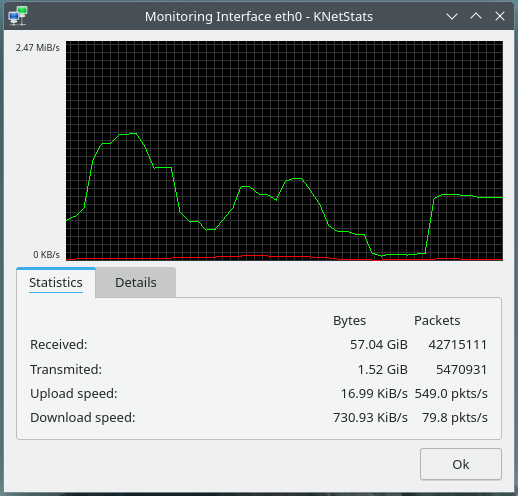
It displays and graphs data transmission information for easy visualization. It also displays information such as associated IPs and MAC addresses.
Enable Display Text Statistics for an interface to add an icon showing upload
above download, in bytes per second. Rates use only the counter difference from
the previous sample divided by the actual elapsed time, without smoothing; the
tray tooltip uses the same rates. Until two valid samples are available, the
icon shows dashes. Short units use powers of 1024: K, M,
G, T, and P. Use bits instead of bytes is off by default; enabling
it converts rates to bits/s, uses powers of 1000 and lowercase suffixes (k,
m, g, t, p), and updates both the preview and tooltip units. Each monitored text icon has a unique digit from 0 to 9;
used digits cannot be selected for another monitored text icon. This limits text
icons to ten interfaces, without limiting ordinary interface monitoring.
The separate text statistics section offers all four digit corners, digit and separate upload/download colors (red/green by default), a background color or transparent background, a statistics font, and actual-size previews. The font family and style are honored; its size is fitted automatically to use as much space as possible. Both rows use the full icon width and draw their text over the interface digit wherever they overlap. A Show interface digit checkbox hides the digit without releasing its assignment. An independent Text shadow checkbox adds a thin contrasting shadow around the traffic text, including when the digit is hidden. The digit stays assigned when an interface disconnects, and unavailable rates appear as dashes. Hover for the interface name and full rates; click either icon to toggle its statistics (on macOS, choose Statistics from its menu).
Display Tray Icon controls the original activity icon independently. Notify Interface Changes controls connection notifications. With both kinds of interface icon disabled, the application's fallback tray icon provides a Statistics menu for monitored interfaces.
The chart scrolls continuously at approximately 30 frames per second, revealing new segments over one measurement interval. Its vertical scale and maximum-speed label transition together. Traces use crisp one-pixel strokes and move in whole device-pixel steps to avoid antialiasing shimmer. Bounded curves round the bends while passing through the samples without overshooting their values. This adds about one sampling interval of visual delay without changing sampled values or the immediate, unsmoothed tray text rates. Animation stops while the chart is hidden and resumes from the current history when shown again.
Double-click the traffic chart to show only the chart, its current maximum-speed scale at the top left, and the interface name at the top right. The compact window has no title bar or border and stays on top. Hold the left mouse button and drag the chart to move it.
Double-click again or press Escape to restore the normal window and its previous geometry. Resize the normal window before entering compact mode to choose the chart size. Tray hide/show preserves the current mode; compact mode and its position are not saved between app sessions. Window positioning and always-on-top behavior depend on the window manager. Native dragging uses Qt 5.15 or newer; older Qt versions use manual positioning, which may be restricted on Wayland.
Interface settings store only values that differ from their defaults. Apply or OK also removes existing default-valued entries; resetting an option to its default removes its override. Color comparisons ignore differences in spelling or case. The monitored-interface list is saved separately as application state. Omitted options follow the application's defaults, including future default changes.
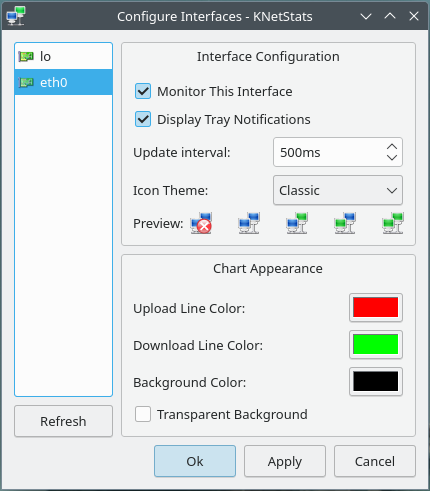
Preview of tray icons with different themes:

If you wish to install a prebuilt release, please check the Releases page.
Otherwise, building instructions are provided below:
An RPM SPEC file (untested) and an Arch PKGBUILD is provided within dist/. You can use those to install QNetStats on the appropriate distros.
QNetStats supports Qt 5.11 or newer and Qt 6 on Linux, Windows 10/11, and macOS, using Qt Widgets and Qt Network. KDE Frameworks are not required. CMake prefers Qt6 when available and otherwise uses Qt5. The provided packaging definitions select Qt6 explicitly.
Manually building QNetStats requires Git and the following packages to be installed
- Ubuntu:
cmake g++ qt6-base-dev(Qt5:qtbase5-dev) - Fedora:
cmake gcc-c++ qt6-qtbase-devel(Qt5:qt5-qtbase-devel) - Arch Linux:
cmake qt6-base(Qt5:qt5-base)
# Clone and enter this repository
$ git clone https://github.com/birdie-github/QNetStats && cd QNetStats

# Configure and build the program
$ cmake -B build
$ cmake --build build

# At this point, you can run QNetStats by executing the binary located at
# build/qnetstats

# Install the program to /usr/local (default)
$ sudo cmake --install build
To choose a Qt version explicitly, configure a separate build directory:
cmake -S . -B build-qt5 -DUSE_QT=5
cmake --build build-qt5

cmake -S . -B build-qt6 -DUSE_QT=6
cmake --build build-qt6
The default is -DUSE_QT=AUTO. An explicitly selected version must be installed; CMake will not fall back to another version.
Install the Xcode Command Line Tools (xcode-select --install), Homebrew, and
Qt. Both Apple Silicon and Intel Macs are supported; the minimum macOS version
is determined by the installed Qt kit.
brew install cmake ninja qt
cmake -S . -B build -G Ninja -DCMAKE_BUILD_TYPE=Release -DUSE_QT=6 \
  -DCMAKE_PREFIX_PATH="$(brew --prefix qt)"
cmake --build build
open build/QNetStats.app
For Qt5, install qt@5, use -DUSE_QT=5 and
-DCMAKE_PREFIX_PATH="$(brew --prefix qt@5)" in a separate build directory.
To make a self-contained Qt6 bundle before copying it to /Applications:
cp COPYING build/QNetStats.app/Contents/Resources/LICENSE.txt
"$(brew --prefix qt)/bin/macdeployqt" build/QNetStats.app
codesign --force --deep --sign - build/QNetStats.app
cmake --install build --prefix /Applications installs the app bundle.
Deploy Qt before installing if the app must run without the build machine's Qt.
CI builds and packages an Apple Silicon (arm64) Qt6 bundle in a DMG image.
It checks bundled dependencies and signatures before packaging.
These packages are ad-hoc signed, without Developer ID signing or notarization;
Gatekeeper may require approval when opening a downloaded app.
QNetStats runs in the menu bar without a Dock icon. Click an interface icon and
choose Statistics to open its window; Configure Interfaces and Quit
QNetStats are available from every icon. Traffic counters use the native
NET_RT_IFLIST2 sysctl API with 64-bit byte and packet counters, without root
privileges. Interface availability uses its native index; connection state uses
Qt's up/running flags and native media status where supported, with a flag-based
fallback for virtual interfaces. IP addresses, netmasks, MTU,
and MAC addresses use Qt Network as on the other platforms. Settings use Qt's
native preferences storage. Notification delivery depends on macOS permissions
and Qt support.
Install CMake, a matching Qt 5.11+ or Qt 6 desktop kit, and its compiler. For example, use an MSVC 2022 x64 Qt kit with Visual Studio 2022 Build Tools, the C++ workload, and the Windows SDK. Only Qt Core, Gui, Widgets, and Network are needed.
For Qt 6, from an x64 Visual Studio developer command prompt, substituting your Qt kit path:
cmake -S . -B build-win -G "Visual Studio 17 2022" -A x64 -DUSE_QT=6 -DCMAKE_PREFIX_PATH="C:/Qt/6.8.3/msvc2022_64"
cmake --build build-win --config Release
"C:/Qt/6.8.3/msvc2022_64/bin/windeployqt.exe" --release --no-translations build-win/Release/qnetstats.exe
build-win\Release\qnetstats.exe
For Qt 5, use -DUSE_QT=5, point CMAKE_PREFIX_PATH at the Qt 5 kit, and use
that kit's compiler and windeployqt. The AUTO selection works on Windows too.
The compiler must match the Qt kit; an MSVC Qt kit cannot be used with MinGW.
windeployqt copies the Qt libraries and plugins needed to run the executable.
The Windows CI workflow builds an x64 Qt6 package on pushes and pull requests
to main, and can also be run manually. Download the
QNetStats-Windows-x64-Qt6-<commit> artifact from the workflow run, extract the
entire archive, and run qnetstats.exe. Keep the DLLs and plugin folders beside
the executable. Artifacts are retained for 14 days.
On Windows, traffic counters and connection status come from the system IP
Helper API. Adapter names shown in the UI are friendly names such as Wi-Fi or
Ethernet; settings use the internal adapter identifier. QSettings stores these
settings under HKEY_CURRENT_USER\Software\QNetStats\QNetStats by default.
- The supported platforms are Linux and Windows 10/11.
- Linux dummy interfaces are excluded from configuration and monitoring, including renamed dummy devices. Missing saved entries named
dummyfollowed by digits are also excluded. Other virtual interfaces, including VPNs, remain available. - Without a system tray, a fallback window provides access to statistics, configuration, and Quit. Closing that window exits the app while no tray is available.
- The original translations have not yet been incorporated, though the files remain in this repository
- Hugo Parente Lima for the original KNetStats project that this is based on, without it this would not exist
- James for porting the app to KDE5.
- @birdie-github for thorough testing during development, and for kindly sponsoring that work
- All the original KNetStats contributors
- OpenAI/ChatGPT who made this version of the application possible