



Swagger Viewer lets you preview Swagger 2.0, OpenAPI 3.0, and OpenAPI 3.1 files as you type in Visual Studio Code. Additionally provides intellisense/linting for the files as well.
It works on swagger files in json and yaml format. Preview happens in real time as you type.
- 🔒 Critical Security Fix: Updated Swagger UI to v5.18.2 (fixes XSS vulnerability)
- ✨ OpenAPI 3.1.0: Full support for the latest OpenAPI specification
- 🎨 Dark Theme: Automatic theme detection based on VS Code settings
- 🌐 Remote Development: Works seamlessly with SSH, WSL, Containers, and Codespaces
- 📁 Workspace Explorer: Tree view showing all Swagger/OpenAPI files in your workspace
- 🌍 URL Preview: Load and preview Swagger files from remote URLs
- 📋 Copy/Paste Support: Full clipboard functionality in preview
- 🔍 Zoom Control: Adjustable zoom level (50-200%)
- 🔄 Hot Reload: Auto-refresh when external references change
- 🚀 Modern Stack: TypeScript 5.7.2, strict mode, latest dependencies
- ⚡ Performance: Improved compilation and runtime
- 🛡️ Type Safety: Enhanced error handling and validation
- ✅ Zero Vulnerabilities: All npm audit issues resolved
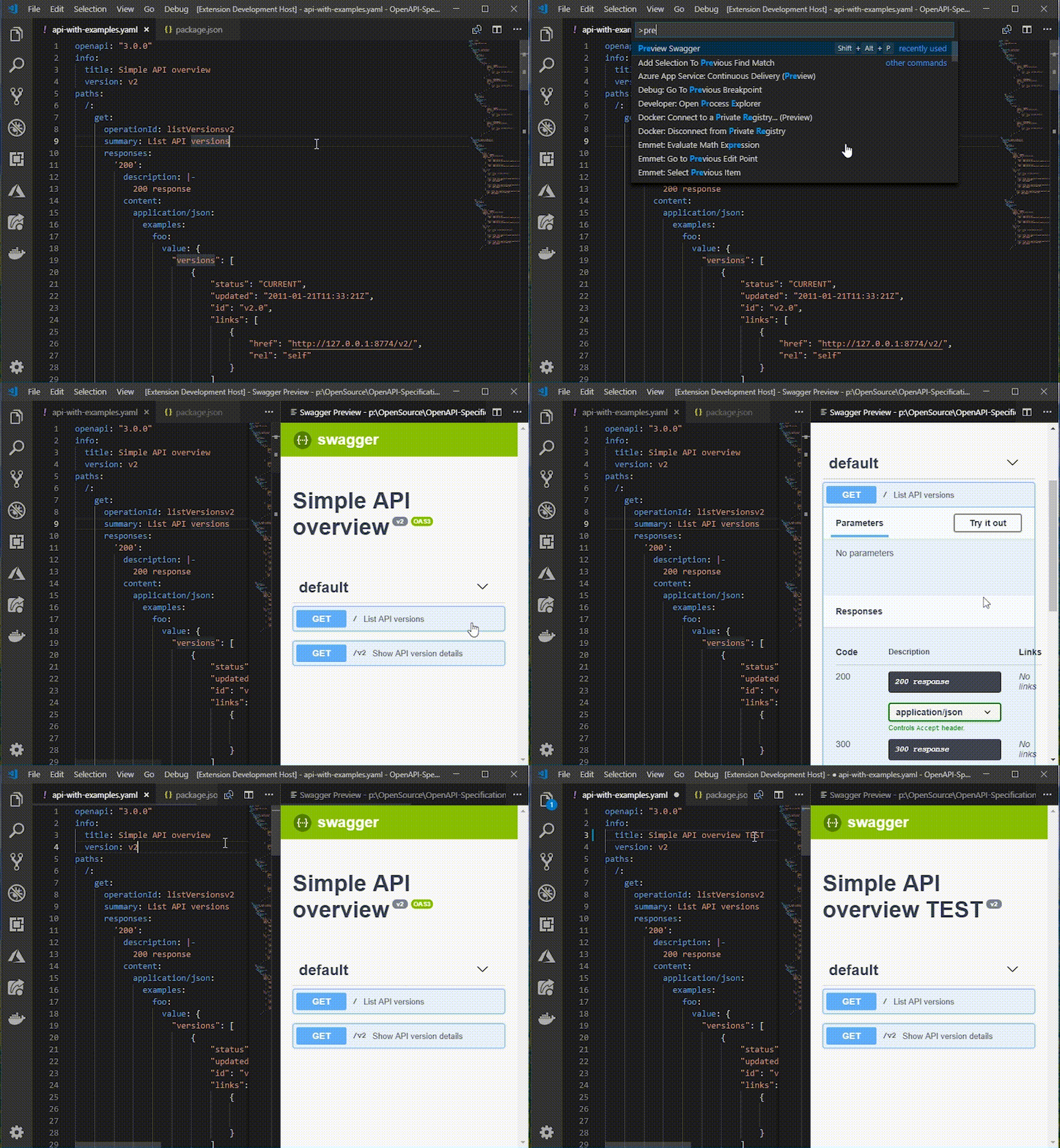
- Open the swagger file and press F1.
- Run the Command
Preview Swagger.
OR
- Press
Shift + Alt + P
OR
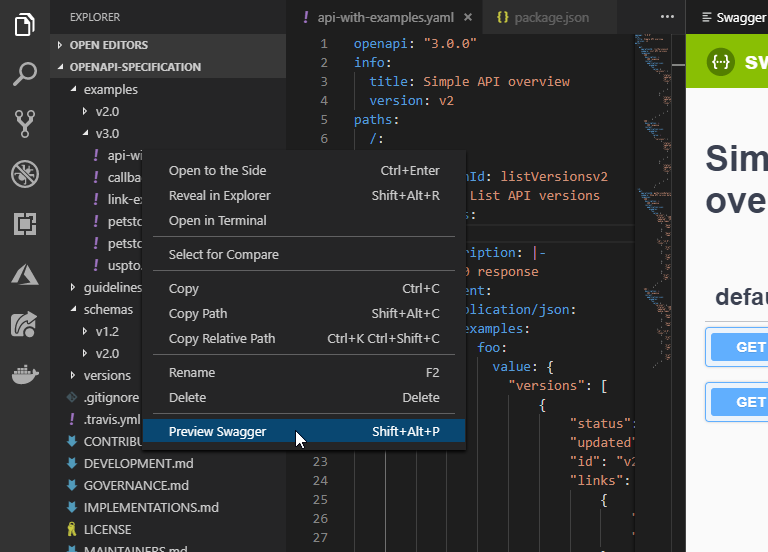
- Right click file in explorer panel and click
Preview Swagger
OR
- Click on any Swagger/OpenAPI file in the Swagger/OpenAPI Files tree view in the Explorer sidebar
- Press F1 and run
Preview Swagger from URL - Enter the URL of your Swagger/OpenAPI file (e.g.,
https://petstore.swagger.io/v2/swagger.json) - The preview will load the remote specification
The extension automatically discovers all Swagger/OpenAPI files in your workspace and displays them in a dedicated tree view in the Explorer sidebar. Click any file to preview it instantly.
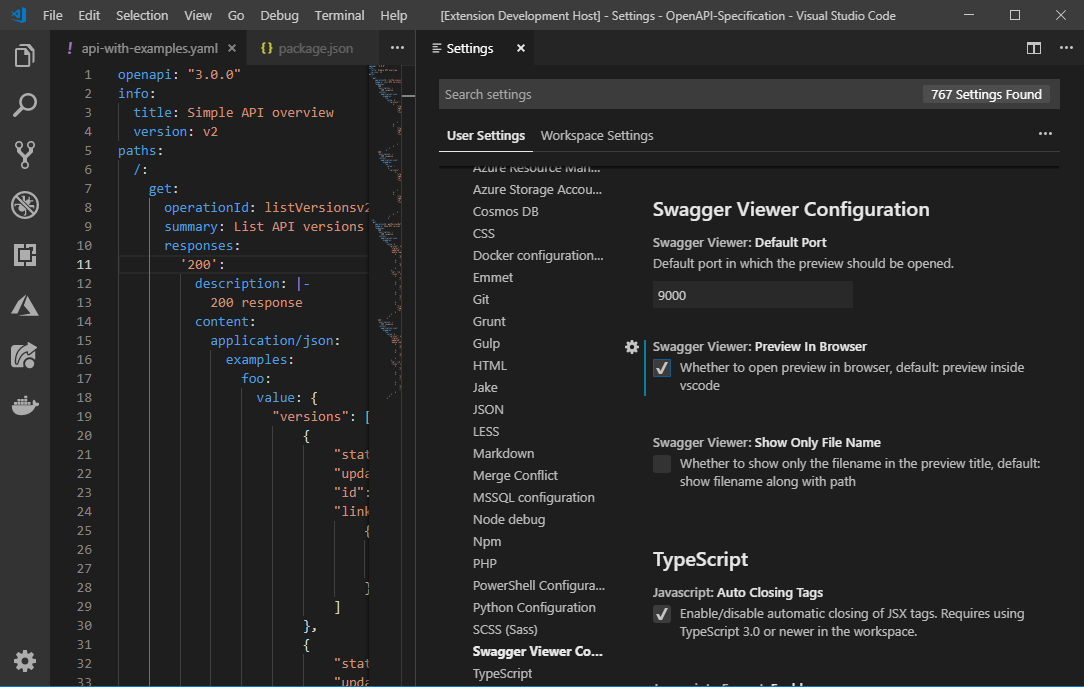
If you want to preview the changes in external browser change the settings Preview In Browser to true in User/Workspace Settings
THEN
- Run the Command
Preview Swagger.
OR
- Press
Shift + Alt + P
Preview will be automatically opened in default browser.
Default port of the preview url can be changed by changing the Default Port value in User/Workspace Settings
In the preview title the file name along with the full path is displayed by default. It can be changed to show only the file name by changing the Show Only File Name to true in User/Workspace Settings
Default host(localhost) of the preview url can be changed by changing the swaggerViewer.defaultHost value in User/Workspace Settings
If the preview text appears too large or too small, you can adjust the zoom level by changing swaggerViewer.zoomLevel (50-200%, default: 100%) in User/Workspace Settings
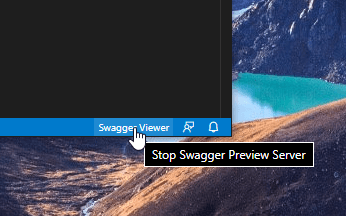
To stop the preview server simply click the status bar item.
This extension requires a Node.js runtime and works in:
- ✅ VS Code Desktop (Windows, macOS, Linux)
- ✅ Remote - SSH
- ✅ Remote - WSL
- ✅ Remote - Containers
- ✅ GitHub Codespaces
- ❌ Browser-based VS Code (vscode.dev, github.dev)
Note: Browser support is planned for a future release using a hybrid architecture.
- ✅ Real-time Preview: See changes as you type
- ✅ Swagger 2.0 Support: Full support for Swagger/OpenAPI 2.0
- ✅ OpenAPI 3.0 & 3.1: Complete OpenAPI 3.0.x and 3.1.x support
- ✅ IntelliSense: Auto-completion and validation via YAML extension
- ✅ Workspace Explorer: Tree view showing all API specs in your workspace
- ✅ URL Import: Preview Swagger files from remote URLs
- ✅ Multiple Files: Preview multiple swagger files simultaneously
- ✅ External References: Support for $ref with hot reload
- ✅ Dark Theme: Automatic theme detection and support
- ✅ Remote Development: Works with SSH, WSL, Containers, and Codespaces
- ✅ Copy/Paste: Full clipboard support in preview
- ✅ Zoom Control: Adjustable zoom level (50-200%)
- ✅ Browser Preview: Option to preview in external browser
- ✅ Customizable: Configure host, port, and display options
- ✅ Secure: Latest Swagger UI with security patches
v3.2.0 Changes (December 2025)
- 🔒 SECURITY: Updated Swagger UI from v3.x to v5.18.2 - fixes DOM XSS vulnerability (#111)
- ✨ NEW: OpenAPI 3.1.0 support (#118)
- 🎨 NEW: Automatic dark theme support based on VS Code theme (#108)
- 🌐 NEW: Remote development support (SSH, WSL, Containers, Codespaces)
- 📁 NEW: Workspace explorer tree view - discover all Swagger/OpenAPI files in workspace
- 🌍 NEW: Preview Swagger files from remote URLs
- 📋 FIXED: Copy/paste support in preview webview (#91)
- 🔍 FIXED: Zoom level customization (50-200%) (#107)
- 🔄 FIXED: Hot reload for external references in YAML files (#117, #106)
- 🐛 FIXED: Multiple file preview issues (#114)
- 🐛 FIXED: Error output spam and extension crashes (#121)
- ⬆️ UPDATED: TypeScript 3.x → 5.7.2 with strict mode enabled
- ⬆️ UPDATED: All dependencies to latest stable versions
- ⬆️ UPDATED: VS Code engine requirement to 1.85.0+
- 🛡️ IMPROVED: Better error handling and user feedback
- 🛡️ IMPROVED: Added Content Security Policy to webviews
- 🗑️ REMOVED: Deprecated
activationEventsfrom package.json - 📝 UPDATED: Modern badges and improved documentation
- ✅ VERIFIED: Zero npm audit vulnerabilities
v3.0.0 Changes
- The primary functionality of the Swagger Viewer extension would be the ability to preview Swagger and OpenAPI files.
- Swagger Viewer will just use the json schema of Swagger and OpenAPI to provide intellisense and linting. Recommend using teh extension OpenAPI (Swagger) Editor for full editing capabilities.
- Intellisense for Swagger 2.0 and OpenAPI 3.0 is available now. Added extension YAML as extensionDependencies for supporting YAML intellisense.
- Default port changed to 18512
- Upgraded swagger-ui to version 3.25.2
- Start preview server in next available port for preview if configured port is not available
- Fix for custom host config
- Ability to stop the preview server
v2.2.2 Changes
v2.2.1 Changes
- Fixed the external refs issue #45
Known Issue
- Validator still gives a warning on relative paths. Will be fixed in next version.
v2.2.0 Changes
v2.1.0 Changes
- Replaced the deprecated
vscode.previewHtmlwith Webview - #50 - Added configuration option to show only file name in title
- Added support for OpenAPI 3.0.3 validation - By @ackintosh #49
v2.0.2 Changes
- Fixed issues with parsing yaml due in yamljs library. Changed to js-yaml library.
- Fixed issue where validation errors are not cleared in yaml file.
v2.0.0 Changes
- Code base changed to TypeScript
- Partial validation support added
- OpenAPI Support added (Not fully tested)
- Only one server runs for the preview page
- Multiple files can be previewed at a time inside vscode
- Context menu added to the explorer to start the preview directly without opening the file
- Using files from swagger-ui-dist npm package - By @Raptor399 #36
- Multiple minor bug fixes
v1.7.0 Changes
v1.6.0 Changes
- Added support for .yaml, .yml, .json and unsaved documents. - By @DW8Reaper #21
v1.5.0 Changes
v1.4.0 Changes
- Fixed - Preview of JSON Swagger files not getting updated in realtime. - By @tmsns
- Fixed - Preview window in vs code not switching to latest file.
- Added - File name in preview window to identify which file is in preview.
- Some performance fixes
v1.3.0 Changes
- Added - Now preview swagger inside the editor itself. - By @ferreus #7
- Added - Preview inside editor by default
v1.2.0 Changes
- Added -
Openbutton in message box. - By @pmentz #3 - Added - shortcut
Shift + Alt + Pto run the command - Added - Ability to change default port from
User/Workspace Settings.
Swagger Viewer utilizes the following open source projects