-
let vs var vs const
-
Function
A. Parameters vs arguments
B. Difference between function declaration & function expression
C. Arrow function
-
Primitive data type
-
Coercion
-
Passing by Value vs. Reference
-
Timer function
-
Difference between Attribute and Property
-
Cookies
-
Difference between innerHTML and innerText
-
Truthy and Falsy values
-
DOM Manipulation
-
Error and error handling
-
Infinities
- Execution context
- Execution Stack
- JavaScript Prototypes
- Spread operator
- Rest syntax
- Destructuring
- Higher-Order function
- Closures
- call() , apply() and bind()
- hoisting : hoist a flash ie move it to the top
- Currying function
- Event Bubbling and Capturing
- Debugging
- Local storage vs Session storage
- Asynchronous js
- JavaScript Design Patterns
- Iterators and generators
- throttle vs debounce
- object creation patterns tutorial - factory , constructor pattern, prototype pattern
- JavaScript ES2020
- Tricky JavaScript interview questions and answers

constmeans that the identifier can't be reassigned. But the value can be changed using var and let- let has a block scope while var has function scope. const also has a block scope
- var has been in js from the beginning and let was introduced recently

let : l : block and better
- var gets hoisted at the top, but variables defined with let doesn't get hoisted
Example of var:
Input:
console.log(x);
let x=5;
console.log(x);

Output:
Error
Example of let:
Input:
console.log(x);
let x=5;
console.log(x);

Output:
Error
In the example below, we get an error because 'let' baz in the second case, has only block scope
function run() {
  var foo = "Foo";
  let bar = "Bar";
  console.log(foo, bar);
{
    let baz = "Bazz";
    console.log(baz);
  }
console.log(baz); // ReferenceError
}

run();

function hi(a,b) // a and b are parameters
{
console.log(“hi “,a,b)
}

Hi(“Riya”,”James”)	// Riya and James are arguments
- Function declaration:
function doStuff() {};
- Function expression:
const doStuff = function() {}
- Function declarations are hoisted but function expressions are not.
Example: Function Expression
alert(foo()); // ERROR! foo wasn't loaded yet
var foo = function() { return 5; }
Example: Function Declaration
alert(foo()); // Alerts 5. Declarations are loaded before any code can run.
function foo() { return 5; }
All arrow functions should be anonymous
CONVERTION

const hi = function (a,b)
{
console.log(“hi “,a,b)
}

Remove ‘function’ and add => btw parameter and the brackets

const hi=(a,b)=>{…}

Following is the list of primitive data types in javascript.
- Boolean
- Null
- Undefined
- Number
- BigInt
- String
- Symbol
typeof NaN  // “number”

typeof Infinity  // “number”


let a;
console.log(a) //undefined

-	Undefined is used when we declare a variable but haven’t assigned a value to it
-	We use null to explicitly tell that there is nothing
Eg: let a=null

When doing mathematical operations, JavaScript can convert numbers to strings:
- usually adds two numbers. If it is a string, it concatenates them.
- always subtracts. So if a string is given, it is converted to number. So 2- 'abc' , the output is NaN

'a' -'b' the output is NaN and typeof NaN is number
 Example
var x = 5 + 7; // x.valueOf() is 12, typeof x is a number

var x = 5 + "7"; // x.valueOf() is 57, typeof x is a string

var x = "5" + 7; // x.valueOf() is 57, typeof x is a string

var x = 5–7; // x.valueOf() is -2, typeof x is a number

var x = 5 - "7"; // x.valueOf() is -2, typeof x is a number

var x = "5" - 7; // x.valueOf() is -2, typeof x is a number

var x = 5 - "x"; // x.valueOf() is NaN, typeof x is a number
- Subtracting a string from a string, does not generate an error but returns NaN (Not a Number):
Example
"Hello" - "Dolly" // returns NaN
Example
var x = "John";
var y = new String("John");
(x === y) // is false because x is a string and y is an object
Example
Boolean('')           // false
Boolean(0)            // false
Boolean(-0)           // false
Boolean(NaN)          // false
Boolean(null)         // false
Boolean(undefined)    // false
Boolean(false)        // false

Boolean({})             // true
Boolean([])             // true
Boolean(Symbol())       // true
!!Symbol()              // true
Boolean(function() {})  // true
Number(null)                   // 0
Number(undefined)              // NaN
Number(true)                   // 1
Number(false)                  // 0
Number(" 12 ")                 // 12
Number("-12.34")               // -12.34
Number("\n")                   // 0
Number(" 12s ")                // NaN
Number(123)                    // 123
- https://developer.mozilla.org/en-US/docs/Web/JavaScript/Equality_comparisons_and_sameness
- https://medium.com/javascript-in-plain-english/how-type-coercion-in-javascript-works-be723e411c0b
- https://www.freecodecamp.org/news/js-type-coercion-explained-27ba3d9a2839/
Type Conversions in JavaScript tutorial

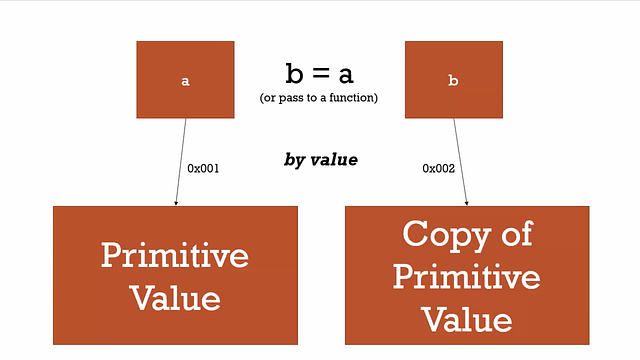
- When assigning a variable (a) a primitive value the equals operator sets up a location (address) in memory (represented by 0x001 in the picture) to store the information and points the variable (a) to that address.

- Passing by reference relates to objects in Javascript (ALL objects including functions).
In some programming languages, you can actually decide whether something is passed by value or reference, with your code syntax. But in JavaScript you don't have that option. All primitive types are by value, and all objects are by reference.
Reference
There are two methods for it:
- setTimeout allows us to run a function once after the interval of time.
- setInterval allows us to run a function repeatedly, starting after the interval of time, then repeating continuously at that interval.


Cookies are the most efficient method of remembering and tracking preferences, purchases, commissions, and other information required for better visitor experience or site statistics.
Cookies are a plain text data record of 5 variable-length fields −
The date the cookie will expire. If this is blank, the cookie will expire when the visitor quits the browser.
The domain name of your site.
The path to the directory or web page that set the cookie. This may be blank if you want to retrieve the cookie from any directory or page.
If this field contains the word "secure", then the cookie may only be retrieved with a secure server. If this field is blank, no such restriction exists.
Cookies are set and retrieved in the form of key-value pairs
document.cookie = "username=Annu; expires=Thu, 1 Oct 2020 10:00:00 UTC";
var x = document.cookie;
      You can change a cookie the same way as you create it:
      document.cookie = "username=John Smith; expires=Thu, 1 Oct 2020 10:00:00 UTC; path=/";
document.cookie = "username=; expires=Thu, 01 Jan 1970 00:00:00 UTC; path=/;";
-
Attributes provide additional information about the HTML elements, attributes are always specified in the start tag and they usually come in name/value pairs.
-
Properties are the values associated with a JavaScript object, these objects are collection of unordered properties and these properties can be usually be changed, added, and deleted.
-
Properties are accessed from DOM (Document Object Model) nodes.
While writing HTML code, we can define attributes on our HTML elements. Then, once the browser parses our code, a corresponding DOM(Document Object Model) node will be created. This node is an object, and therefore it has properties.
Example
<input id="inputId" type="text" value="Name:">
The id property is a reflected property for the id attribute.Getting the property reads the attribute value, and setting the property writes the attribute value.
The innerHTML tag returns the text including all spacing and inner element tags. On the other hand, innerText property returns just the text, without spacing and inner element tags.
In simple words, innerText retrieves and sets the content of the tag as plain text, whereas innerHTML retrieves and sets the content in HTML format.
Example
If HTML has the following tag,
<p id="example">This element has extra spacing and contains <span>a span element</span>.</p>
and the JavaScript has the following code,
var iText = document.getElementById("example").innerText
var iHtml = document.getElementById("example").innerHTML
The value stored in iText would be This element has extra spacing and contains a span element. and iHTML would have This element has extra spacing and contains <span>a span element</span>..
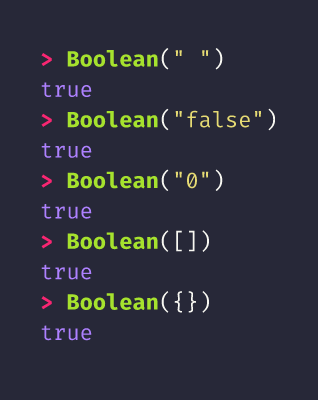
In JavaScript, a truthy value is a value that is considered true when encountered in a Boolean context. All values are truthy unless they are defined as falsy.
JavaScript uses type coercion in Boolean contexts.
Some examples of truthy values in JavaScript: (which will be coerced to true in boolean contexts, and thus execute the if block)
if (true)
if ({})
if ([])
if (42)
if ("0")
if ("false")
if (new Date())
if (-42)
if (12n)
if (3.14)
if (-3.14)
if (Infinity)
if (-Infinity)
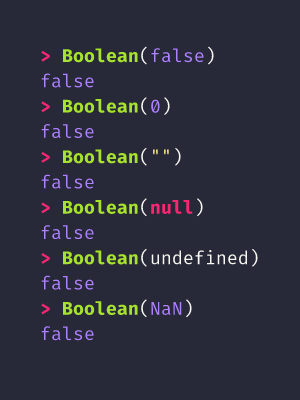
A falsy (sometimes written falsey) value is a value that is considered false when encountered in a Boolean context.
JavaScript uses type conversion to coerce any value to a Boolean in contexts that require it, such as conditionals and loops.
There are 8 falsy values:
false	         The keyword false
0                The number zero
-0	             The number negative zero
0n	             BigInt, when used as a boolean, follows the same rule as a Number. 0n is falsy.
""	             Empty string value
null	         null - the absence of any value
undefined	     undefined - the primitive value
NaN	             NaN - not a number
Document Object Model, or DOM for short, represents all page content as objects that can be modified. And Javascript allow us to modify DOM.
The main 2 objects provided by the DOM API that you will interact the most with are document and window.
- The Window object - The window object represents the window that contains the DOM document. window.document points to the document object loaded in the window. Properties and methods of this object can be called without referencing window explicitly, because it represents the global object. So, the previous property window.document is usually called just document.
- Properties - Here is a list of useful Window properties you will likely reference a lot:
- console points to the browser debugging console. Useful to print error messages or logging, using console.log, console.error and other tools (see the Browser DevTools article)
- document as already said, points to the document object, key to the DOM interactions you will perform
- history gives access to the History API
- location gives access to the Location interface, from which you can determine the URL, the protocol, the hash and other useful information.
- localStorage is a reference to the Web Storage API localStorage object
- sessionStorage is a reference to the Web Storage API sessionStorage object
- Methods - Here is a list of useful Window Methods you will likely reference a lot:
- alert(): which you can use to display alert dialogs
- postMessage(): used by the Channel Messaging API
- requestAnimationFrame(): used to perform animations in a way that’s both performant and easy on the CPU
- setInterval(): call a function every n milliseconds, until the interval is cleared with clearInterval()
- clearInterval(): clears an interval created with setInterval()
- setTimeout(): execute a function after ‘n’ milliseconds
- setImmediate(): execute a function as soon as the browser is ready
- addEventListener(): add an event listener to the document
- removeEventListener(): remove an event listener from the document
- Document - The Document interface represents any web page loaded in the browser and serves as an entry point into the web page's content, which is the DOM tree.
Note:-
- Window is the main JavaScript object root, also known as the global object in a browser, also can be treated as the root of the document object model. You can access it as window.
- Document is the main object of the potentially visible/rendered document object model/DOM.
Example of a DOM tree:-
Representation of a portion of the DOM pointing to the head and body tags:

Tags are element nodes (or just elements) and form the tree structure: is at the root, then and are its children, etc.
All operations on the DOM start with the document object. That’s the main “entry point” to DOM. From it we can access any node.

You can you can use Node.parentNode or Node.parentElement (where Node means a node in the DOM).

- To access all the Children Element Nodes of a node, use Node.childNodes.

- To get the first child Element Node, use Node.firstElementChild. To get the last child Element Node, use Node.lastElementChild:

-
Node.firstChild - It is a read-only property returns the node's first child in the tree, or null if the node has no children. If the node is a Document, it returns the first node in the list of its direct children.
-
Node.lastChild - It is a read-only property returns the last child of the node. If its parent is an element, then the child is generally an element node, a text node, or a comment node. It returns null if there are no child elements.

The DOM offers various methods to edit the nodes of the page and alter the document tree with:-
- document.createElement(): creates a new Element Node
- document.createTextNode(): creates a new Text Node you can create new elements, and add them to the DOM elements you want as children, by using document.appendChild():
const div = document.createElement('div')
div.appendChild(document.createTextNode('Hello world!'))
- first.removeChild(second) removes the child node “second” from the node “first”.
- document.insertBefore(newNode, existingNode) inserts “newNode” as a sibling of “existingNode”, placing it before that in the DOM tree structure.
- element.appendChild(newChild) alters the tree under “element”, adding a new child Node “newChild” to it, after all the other children.
- element.prepend(newChild) alters the tree under “element”, adding a new child Node “newChild” to it, before other child elements. You can pass one or more child Nodes, or even a string which will be interpreted as a Text node.
- element.replaceChild(newChild, existingChild) alters the tree under “element”, replacing “existingChild” with a new Node “newChild”.
- element.insertAdjacentElement(position, newElement) inserts “newElement” in the DOM, positioned relatively to “element” depending on “position” parameter value. See the possible values.
- element.textContent = 'something' changes the content of a Text node to “something”.
Reference
POSITIVE_INFINITY is displayed when a number exceeds the upper limit of the floating point numbers, which is  "1.797693134862315E+308"

       alert(Math.pow(10, 1000)); /* Infinity */
NEGATIVE_INFINITY is displayed when a number exceeds the lower limit of the floating point numbers, which is "-1.797693134862316E+308".
POSITIVE_INFINITY vs. MAX_VALUE (or NEGATIVE_INFINITY vs. MIN_VALUE )
-
The value of the MAX_VALUE property is the largest number your JavaScript interpreter can handle. Larger value will be viewed as POSITIVE_INFINITY.
-
The value of NEGATIVE_INFINITY and POSITIVE_INFINITY are read-only they cannot be changed by your scripts; they are returned by JavaScript whenever a function or operation returns a number larger than the MAX_VALUE the JavaScript interpreter can handle See the code snippet


""To err is human..." Everyone makes a mistake, even the seasoned developer. Hence, it's essential to know about different errors and how to solve them. Errors can be divided into two groups: compile-time errors and run-time errors.
Compile-time errors are a class of errors which prevents the program from compiling:
- syntax error: incorrect keyword, a forgotten symbol
- calling a non-existing method
- wrong source code file name
In the case of JavaScript, compile-time errors occur at interpret time. For example, in the below code, a syntax error occurs because it is missing left Parentheses '(' in the print function/method invocation.
<script type = "text/javascript">
   <!--
      window.print);
   //-->
</script>
To avoid such errors, developers use a modern Integrated Development Environment with a code analyzer.
Run-time errors (also known as "exceptions") are errors when the program is running. Run-time errors will cause your program to behave unexpectedly or may even stop the execution.
There are two subtypes of run-time errors:
- logic errors – program produces a wrong result because of incorrect code. For example, for addition writing statement as "sum = x - y;"
- unhandled exceptional events like division by zero
To avoid such errors, developers must learn debugging skills, write automated tests, and implement code reviews.

When your program has a "broken" line of code, your program dies, and after stopping program execution, an error message is printed on the console.
But can we add some immunity to our program so that rather than dying, it can handle the error?
Yes, we can! "try..catch" statement lets us handle the error and do something useful. For example, rather than crashing when a number is divided by zero, we can print a message that the divider can't be zero.
try {

  // code where exception can exist

} catch (err) {

  // steps that should be taken to handle exception

}
When a JavaScript engine executes a script, it creates execution contexts. Execution context (EC) is defined as the environment in which the JavaScript code is executed. By environment, I mean the value of this, variables, objects, and functions JavaScript code has access to at a particular time.
Execution Context (Global), created by JS Engine contains 3 important things for you:

- Global object - window
- Special Object this
- Ref to outer environment
Each execution context has two phases: the creation phase and the execution phase.
A. Creation PHASE
-
Creation phase is the phase in which the JS engine has called a function but its execution has not started. In the creation phase, JS engine is in the compilation phase and it just scans over the function code to compile the code, it doesn’t execute any code.
-
As the parser runs through your code and begins to set up what you've written for translation, it recognizes where you've created variables and where you've created functions. And so it sets up in this creation phase, the memory space for the variables and functions. And it's that step that is somewhat confusingly called hoisting.
-
All this means is that before your code begins to be executed line by line, the JavaScript engine has already set aside memory space for the variables that you've created in that entire code that you've built, and all of the functions that you've created as well. So those functions and those variables exist in memory. So when the code begins to execute line by line, it can access them.
-
However, when it comes to variables, it's a little bit different. You see the function in its entirety is placed into memory space, meaning that the function, its name and the code inside the function is being executed. However the next phase, the execution phase is where it actually executes your code line by line, that's when these kind of assignments are set, where var a = 1. So the JavaScript engine when it sets up the memory space for a, it doesn't know what its value will ultimately end up being until it starts executing its code. So instead, it puts a placeholder called undefined. That placeholder means oh, I don't know what this value is yet.
-
All variables in JavaScript are initially set to undefined, and functions are sitting in memory in their entirety.
B. Execution PHASE
When the code is executed line-by-line (by JS interpreeter) it can access the variables defined inside Execution Context variable assignment are done in this phase
<br/ >
When the JavaScript engine first encounters your script, it creates a global execution context and pushes it to the current execution stack. Whenever the engine finds a function invocation, it creates a new execution context for that function and pushes it to the top of the stack.
The engine executes the function whose execution context is at the top of the stack. When this function completes, its execution stack is popped off from the stack, and the control reaches to the context below it in the current stack.

Every JavaScript object has an internal hidden "slot" called [[Prototype]]. You can think of a slot as a property on an object, internal to the JavaScript engine, hidden from the code you write
Prototype chain The prototype chain mechanism is simple: When you access a property p on object obj, the JavaScript engine will search this property inside obj object. If the engine fails to search, it continues searching in the prototype of obj object and so on until reaching Object.prototype. If after the search has finished, and nothing has been found the result will be undefined
Modern JavaScript implementations allow read and/or write access to the [[Prototype]] in the following ways:
- The new operator (configures the prototype chain on the default object returned from a constructor function),
- The extends keyword (configures the prototype chain when using the class syntax),
- Object.create will set the supplied argument as the [[Prototype]] of the resulting object,
- Object.getPrototypeOf and Object.setPrototypeOf (get/set the [[Prototype]] after object creation), and
- The standardized accessor (ie. getter/setter) property named proto (similar to 4.)
** “The proto is simply a reference to the prototype object from which the instance has inherited”.**
In a language implementing classical inheritance like Java, C# or C++ you start by creating a class--a blueprint for your objects--and then you can create new objects from that class or you can extend the class, defining a new class that augments the original class.
In JavaScript you first create an object (there is no concept of class), then you can augment your own object or create new objects
Prototype Property: Prototype-based Inheritance Prototype is important in JavaScript because JavaScript does not have classical inheritance based on Classes (as most object oriented languages do), and therefore all inheritance in JavaScript is made possible through the prototype property. JavaScript has a prototype-based inheritance mechanism.Inheritance is a programming paradigm where objects (or Classes in some languages) can inherit properties and methods from other objects (or Classes). In JavaScript, you implement inheritance with the prototype property. For example, you can create a Fruit function (an object, since all functions in JavaScript are objects) and add properties and methods on the Fruit prototype property, and all instances of the Fruit function will inherit all the Fruit’s properties and methods.
https://javascript.info/prototype-inheritance
spread syntax refers to the use of an ellipsis of three dots ( … ) to expand an iterable object into the list of arguments
const foo = ['hello', 'bonjour', 'konnichiwa'];
const bar = [...foo];
console.log(bar);
// ['hello', 'bonjour', 'konnichiwa']
Difference between spread and assignment operator
const foo = ['hello', 'bonjour', 'konnichiwa'];
const bar1 = [...foo];
const bar2 = foo;
bar1.push('a');
bar2.push('b');
console.log(foo); //["hello", "bonjour", "konnichiwa", "b"]
console.log(bar1); // ["hello", "bonjour", "konnichiwa", "a"]
console.log(bar2); // ["hello", "bonjour", "konnichiwa", "b"]
Arrays and objects are mutable while strings and int are immutable. So, when we write bar2 = foo, we are using call by reference. Hence, when we edited bar2.push('b'); the value of foo also changed But using spread operator, we are creating two instances
// destrucing in objects
const foo = {
  english: 'hello',
  french: 'bonjour',
  japanese: 'konnichiwa'
};
const bar = {...foo};
console.log(bar);
// { english: 'hello', french: 'bonjour', japanese: 'konnichiwa' }
The rest syntax can also be used to pick up property keys that are not already picked up by the destructuring pattern. Those keys and their values are copied into a new object:
let person = {name: "Sarah", country: "Nigeria", job: "Developer" friends: ["Annie", "Becky"]};
let person = {name: "Sarah", country: "Nigeria", job: "Developer" friends: ["Annie", "Becky"]};
let {name, friends, ...others} = person;
console.log(name);//"Sarah"
console.log(friends);//["Annie", "Becky"]
console.log(others);// {country: "Nigeria", job: "Developer"}
The destructuring assignment syntax is a JavaScript expression that makes it possible to unpack values from arrays, or properties from objects, into distinct variables.
- Arrays : We can write any name for the parameter(greeting, prononu) and order is important
let introduction = ["Hello", "I" , "am", "Sarah"];
let [greeting, pronoun] = introduction;
console.log(greeting);//"Hello"
console.log(pronoun);//"I"
- Objects: Here the parameter name should be equal to the key of the object and order is not important
//USUAL MANNER
let person = {name: "Sarah", country: "Nigeria", job: "Developer"};
let name = person.name;
let country = person.country;
let job = person.job;
console.log(name);//"Sarah"
console.log(country);//"Nigeria"
console.log(job);//Developer"


// DESTRUCTURING
let {name, country, job} = person;
console.log(name);//"Sarah"
console.log(country);//"Nigeria"
console.log(job);//Developer"
A Higher-Order function is a function that receives a function as an argument or returns the function as output.

a. Map function
The map() method creates a new array with the results of calling a function for every array element. The map() method calls the provided function once for each element in an array, in order. It does not change the original array.
const arr1 = [1, 2, 3];
const arr2 = arr1.map(item => item * 2);
console.log(arr2);
b. Filter
const persons = [
  { name: 'Peter', age: 16 },
  { name: 'Mark', age: 18 },
  { name: 'John', age: 27 },
  { name: 'Jane', age: 14 },
  { name: 'Tony', age: 24},
];const fullAge = persons.filter(person => person.age >= 18);console.log(fullAge);
A closure is a function having access to the parent scope, even after the parent function has closed.
A Basic Example of Closures in JavaScript:
function outerFunc() {
  let outerVar = 'I am outside!';

  function innerFunc() {
    console.log(outerVar); // => logs "I am outside!"
  }

  return innerFunc;
}

const myInnerFunc = outerFunc();
myInnerFunc();
Closure means that an inner function always has access to the vars and parameters of its outer function, even after the outer function has returned.


Refer : https://dmitripavlutin.com/simple-explanation-of-javascript-closures/
They all attach this into function (or object) and the difference is in the function invocation (see below).
- call attaches this into function and executes the function immediately:
var person = {
  name: "James Smith",
  hello: function(thing) {
    console.log(this.name + " says hello " + thing);
  }
}
person.hello("world");  // output: "James Smith says hello world"
person.hello.call({ name: "Jim Smith" }, "world"); // output: "Jim Smith says hello world"
- bind attaches this into function and it needs to be invoked separately like this:
var person = {
  name: "James Smith",
  hello: function(thing) {
    console.log(this.name + " says hello " + thing);
  }
}

person.hello("world");  // output: "James Smith says hello world"

var helloFunc = person.hello.bind({ name: "Jim Smith" });

helloFunc("world");  // output: Jim Smith says hello world"
or like this:
var helloFunc = person.hello.bind({ name: "Jim Smith" }, "world");
helloFunc();  // output: Jim Smith says hello world"
- apply is similar to call except that it takes an array-like object instead of listing the arguments out one at a time:
function personContainer() {

  var person = {
     name: "James Smith",
     hello: function() {
       console.log(this.name + " says hello " + arguments[1]);
     }
  }
  person.hello.apply(person, arguments);
}

personContainer("world", "mars"); // output: "James Smith says hello mars", note: arguments[
1. You can use call()/apply() to invoke the function immediately. bind() returns a bound function that, when executed later, will have the correct context ("this") for calling the original function. So bind() can be used when the function needs to be called later in certain events when it's useful.
- Note that when using the apply() function the parameter must be placed in an array. Call() accepts both an array of parameters and a parameter itself.
const greetingJohn = greeting.bind(john, 'uk');
greetingJohn();//must be called again
greeting.call(person,'India');
greeting.apply(person,['India']);// has an array
Refernce
https://medium.com/r?url=https%3A%2F%2Fcodesquery.com%2Fjavascript-call-apply-bind-method%2F
Hoisting is JavaScript's default behavior of moving declarations to the top.In JavaScript, a variable can be declared after it has been used.In other words; a variable can be used before it has been declared
- Currying is a transformation of functions that translates a function from callable as f(a, b, c) into callable as f(a)(b)(c).
Currying is when you break down a function that takes multiple arguments into a series of functions that each take only one argument. Here's an example in JavaScript:
function add (a, b) {
  return a + b;
}
add(3, 4); // returns 7
This is a function that takes two arguments, a and b, and returns their sum. We will now curry this function:
function add (a) {
  return function (b) {
    return a + b;
  }
}
This is a function that takes one argument, a, and returns a function that takes another argument, b, and that function returns their sum.
add(3)(4);
var add3 = add(3);
add3(4);
The first statement returns 7, like the add(3, 4) statement. The second statement defines a new function called add3 that will add 3 to its argument. This is what some people may call a closure. The third statement uses the add3 operation to add 3 to 4, again producing 7 as a result.
Event bubbling and capturing are two ways of event propagation in the HTML DOM API, when an event occurs in an element inside another element, and both elements have registered a handle for that event.

With bubbling, the event is first captured and handled by the innermost element and then propagated to outer elements. With capturing, the event is first captured by the outermost element and propagated to the inner elements.
https://www.youtube.com/watch?v=-bS6u_oQFtc&list=PL7pEw9n3GkoW5bYOhVAtmJlak3ZK7SaDf&index=29
Function keyword followed by an asterisk is used to define a generator function, which returns a Generator object. We can exit and re-entered the generator function later on. In case of re-entrances, their context (variable bindings) will be saved. Important point to note here is that calling a generator function does not execute its body immediately, in fact it returns an iterator object for the function. In short, a generator appears to be a function but it behaves like an iterator.
- Generators are a special class of functions that simplify the task of writing iterators.
- A generator is a function that produces a sequence of results instead of a single value, i.e you generate a series of values.
Syntax :

function* generatorFunctionName([param[, param[, ... param]]]) {
   statements
}
name : Function name
param | Optional : Formal parameter for the function.
statements : Comprising the body of the function.
  function* generator(i) {
  yield i;
  yield i + 1;
}
const gen = generator(1);
console.log(gen.next().value);
// expected output: 1
console.log(gen.next().value);
// expected output: 2
- Callback function
- Promises
- Async await
JavaScript is synchronous by default and is single threaded. This means that code cannot create new threads and run in parallel. JavaScript introduced several features that help us with asynchronous code that do not involve using callbacks:
Reference
- https://flaviocopes.com/javascript-promises/
- https://flaviocopes.com/javascript-async-await/
- https://www.youtube.com/watch?v=IGoAdn-e5II
https://medium.com/better-programming/javascript-design-patterns-25f0faaaa15
Iterators are a new way to loop over any collection in JavaScript.
https://codeburst.io/a-simple-guide-to-es6-iterators-in-javascript-with-examples-189d052c3d8e
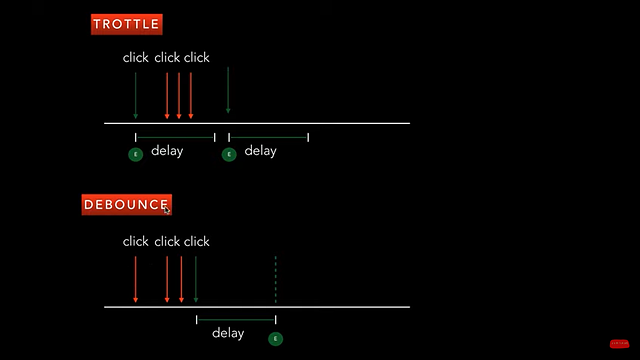
Throttling and debouncing are two ways to optimize event handling.
-
Debouncing enforces that a function not be called again until a certain amount of time has passed without it being called. As in "execute this function only if 100 milliseconds have passed without it being called."
-
Throttling enforces a maximum number of times a function can be called over time. As in "execute this function at most once every 100 milliseconds."
Good demo (codepen) https://css-tricks.com/the-difference-between-throttling-and-debouncing/
https://www.youtube.com/watch?v=xizFJHKHdHw&list=PL7pEw9n3GkoW5bYOhVAtmJlak3ZK7SaDf&index=5
JavaScript has a multitude of styles for creating objects
var o = {
  x: 42,
  y: 3.14,
  f: function() {},
  g: function() {}
};
This is the absolute simplest way to create a family of objects that share the same structure, interface, and implementation. Rather than creating an object literal directly, instead we return an object literal from a function. This way, if we need to create the same type of object multiple times or in multiple places, we only need to invoke a function:
function thing() {
  return {
    x: 42,
    y: 3.14,
    f: function() {},
    g: function() {}
  };
}
var o = thing();
Reference
-
https://www.sitepoint.com/javascript-object-creation-patterns-best-practises/
-
https://www.javascripttutorial.net/create-objects-in-javascript/
-
https://medium.com/r?url=https%3A%2F%2Fwww.dofactory.com%2Fjavascript%2Fdesign-patterns
The new JavaScript features in ES2020 are:
➡️ String.prototype.matchAll
➡️ import()
➡️ BigInt
➡️ Promise.allSettled
➡️ globalThis
➡️ for-in mechanics
➡️ Optional Chaining
➡️ Nullish coalescing Operator
Reference
- https://radiant-brushlands-42789.herokuapp.com/medium.com/better-programming/javascript-es2020-features-with-simple-examples-d301dbef2c37
- https://www.freecodecamp.org/news/javascript-new-features-es2020/
localStorage and sessionStorage accomplish the exact same thing and have the same API, but with sessionStorage the data is persisted only until the window or tab is closed, while with localStorage the data is persisted until the user manually clears the browser cache or until your web app clears the data. The examples in this post are for localStorage, but the same syntax works for sessionStorage.
Create key/value pair entries with localStorage.setItem, providing a key and a value:
let key = 'Item 1';
localStorage.setItem(key, 'Value');
Reference
Iterators are a new way to loop over any collection in JavaScript. An iterable is an object that can return an iterator using the iter() function; while an iterator is an object that keeps state and produces the next value when you call the next() function on it.
Following values are iterables:
- Arrays
- Strings
- Maps
- Sets
- DOM data structures (work in progress)https://github.com/TroyTae/game-of-life/blob/master/README.md
Plain objects are not iterable!
Iterators are Objects which uses iterator protocols.
- After defining iterator next() method is used to iterate over the collection.
let numbers = new Sequence(1,2,3,4,5,6);
let iterator = numbers[Symbol.iterator]();

let result = iterator.next();

while(!result.done) {
  console.log(result.value);
  result=iterator.next()
}
What is the difference between loops and iterators? There are two types of for loops which behave very differently.
- One uses indices.
let arr = [1,2,3,4]
for(let index = 0; i< arr.length; i++){
  console.log(arr[index])
}
- This kind of loop isn't always possible. For example, Lists have indices, but Sets don't, because they're unordered collections. The other one, the foreach loop uses an Iterator behind the scenes:.
let mySet = new Set();
mySet.add(1);
mySet.add(2);
mySet.add(3);
mySet.add(4);
for (let item of mySet) {
  console.log(item)
}
And finally, you can use an Iterator, which also works with any Iterable: The iterator provides advantage in cases
- Where you want to move over the collection in both forward and backward using next() and previous() function.
- When you want to remove elements from collections safely while iterating over collections. When you want to do more than just iterating over collection Iterator can be used.
- You can loop through the list using a for loop as many times as you want, but you can only loop through the list using an iterator once. To loop again using an iterator you will need to reinitialize the iterator.
We have to initialize the iterator over the collection before using it.
//Wrong
let arr = [1,2,3,4,5,6];
arr.next();

//Correct
let arr = [1,2,3,4,5,6]
let iterator = arr[Symbol.iterator]();

iterator.next();
References
- https://codeburst.io/a-simple-guide-to-es6-iterators-in-javascript-with-examples-189d052c3d8e
- https://developer.mozilla.org/en-US/docs/Web/JavaScript/Guide/Iterators_and_Generators
- https://developer.mozilla.org/en-US/docs/Web/JavaScript/Reference/Iteration_protocols
Find output:
a. console.log(5<6<7) b. console.log(5>6>7)
a. console.log(5<6<7) =console.log(true<7)=true b. console.log(5>6>7) =console.log(true>7)=false
Video
-
https://www.youtube.com/watch?v=QCQVttjblRs&list=PL7pEw9n3GkoWn5TcqAdmSzXcvC3d_tfAh&index=5
-
Tricky JavaScript Interview Questions and Answers https://www.youtube.com/watch?v=qsNxdukPc2U&list=PL7pEw9n3GkoWn5TcqAdmSzXcvC3d_tfAh&index=6
-
JavaScript Mock Interview https://www.youtube.com/watch?v=OOC-ypVnHAY&list=PL7pEw9n3GkoWn5TcqAdmSzXcvC3d_tfAh&index=12