A shell around your running app: the app live in the middle, and around it the
files that steer agents and describe the product — specs, Claude skills,
AGENTS.md/CLAUDE.md, subagents, slash commands, docs — as pages you can
read and edit. Anyone looking at the app can change a spec, tick off a task,
or ask an agent to change the app with the open page as context, and turn the
result into a pull request.
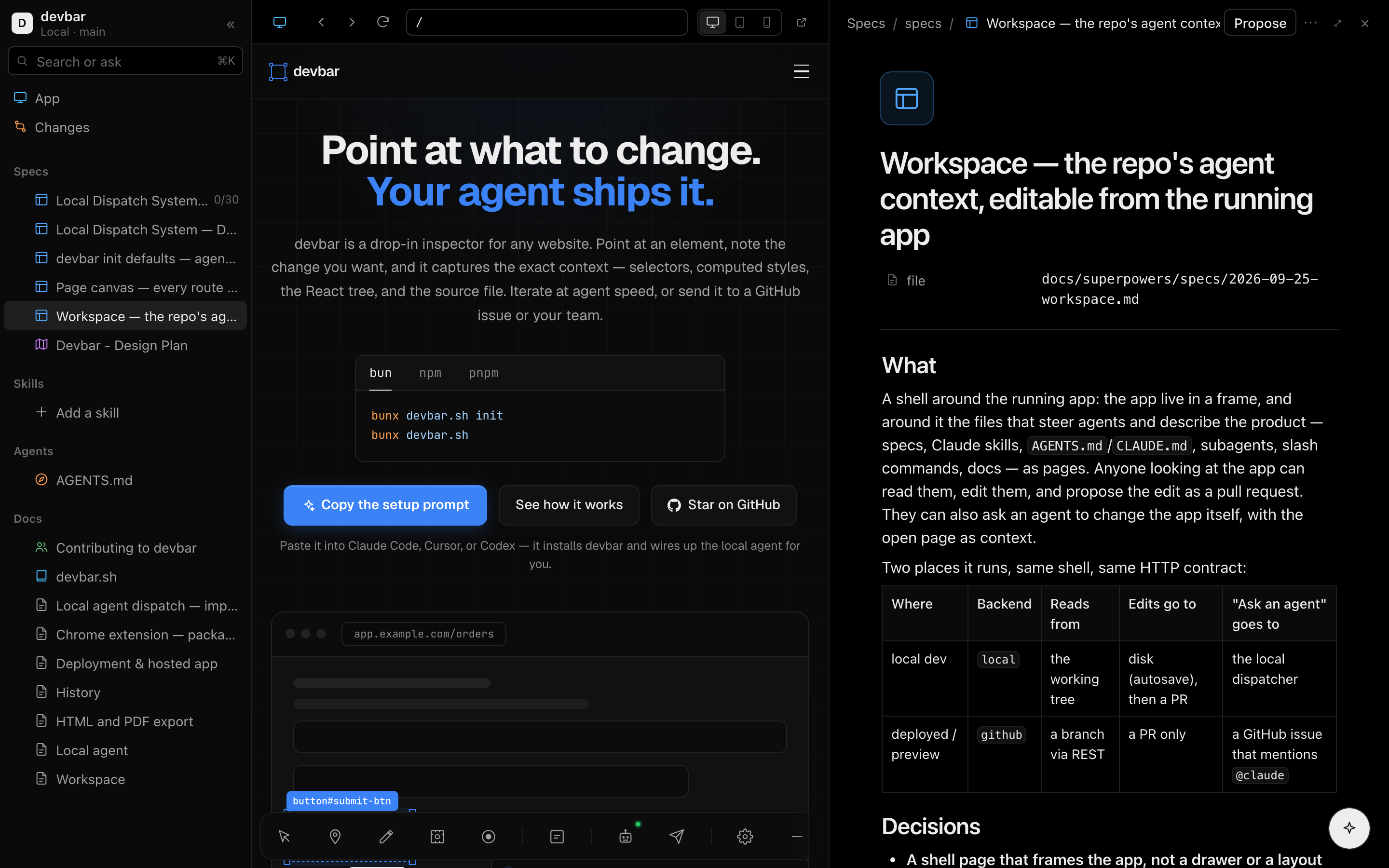
It is laid out like Notion — a sidebar of pages, pages that open beside the app in a side peek or as a full page, block editing, ⌘K — and set in Vercel's black and white, with the colour carried by the icons: each kind of page has its hue (specs blue, tasks green, plans purple, skills amber, agent instructions orange, subagents pink, commands teal), or the emoji someone picked for it.
Press the book button on the toolbar, or Alt+W: the tab turns into the shell,
framing the page you were on. The same button on the framed app's toolbar
(or Alt+W there), or Open app in the shell's top bar, takes you back out
to wherever the frame is.
The shell is a page of its own, served wherever the Workspace API is:
| Where | Shell URL |
|---|---|
the local devbar server (bunx devbar.sh) |
http://127.0.0.1:3100/ — with one project it goes straight to its shell |
devbar.sh/next mounted at /api/devbar |
/api/devbar/shell (redirect /devbar to it for a nicer address) |
?url= says which page to frame. The shell only frames its own host, or — from
the local server — a loopback origin or one a project claims, so it cannot be
used to put another site under this one's name. The shell page itself sends
frame-ancestors 'none': nothing frames the shell.
With no workspace prop the toolbar uses the local devbar server's copy of
whichever project claims the page, so a project already running bunx devbar.sh gets the shell with nothing to wire. Point it anywhere else with the
prop:
<Devbar workspace="/api/devbar" />  // your own route (below)
<Devbar workspace={false} />        // no book button
The app runs in a frame with a small browser around it: back, forward, reload, an address bar, and full / tablet (820px) / phone (390px) widths. It is your app, toolbar and all — annotate it, submit, dispatch, as ever.
The shell and the frame are usually different origins (the local server frames
localhost:3000), so neither can see into the other. The toolbar in the app
tells a shell it trusts where the page is — the address bar follows client-side
navigation — and follows its back, forward and reload. It trusts only a shell
served by the app's own origin, the local devbar server, or the workspace
endpoint, and never sends anything but a URL, a title and its theme. The shell
wears that theme — light or dark, whichever the toolbar is showing — rather than
the OS's, and follows it when the app switches. On a page without the toolbar,
back and forward stay disabled, reload re-points the frame, and the shell follows
the OS.
An app that sends X-Frame-Options: DENY (or a frame-ancestors that excludes
the shell) cannot be framed; the Next.js shell is same-origin, so SAMEORIGIN
is fine there.
| Sidebar section | Files |
|---|---|
| Specs | markdown under specs/, docs/specs/, .specify/specs/, .kiro/specs/, docs/superpowers/specs/, docs/superpowers/plans/, rfcs/, docs/rfcs/; root SPEC.md, PLAN.md, ROADMAP.md, TODO.md |
| Skills | .claude/skills/<name>/SKILL.md, skills/<name>/SKILL.md |
| Agents | Instructions: AGENTS.md, CLAUDE.md, GEMINI.md at any depth, .github/copilot-instructions.md, .cursor/rules/*.mdc, .kiro/steering/, .specify/memory/. Subagents: .claude/agents/. Commands: .claude/commands/ |
| Docs | root README.md, CONTRIBUTING.md, CHANGELOG.md; markdown under docs/ |
A spec folder — specs/001-auth/{spec,plan,tasks}.md — is one page with its
plan and tasks nested beneath it, and - [ ] / - [x] items show as progress.
node_modules, dist, build, .next, out, coverage and vendor are
skipped, and locally only files git would track are listed (untracked ones
included, ignored ones not).
That list is also the edit boundary: the workspace reads and writes these files
and nothing else. It will not open src/app.ts for editing, whoever asks.
A page opens in a side peek beside the app; ⤢ makes it a full page, and
App in the sidebar brings the app back. At the top of every page: its icon,
the title, and the frontmatter as properties — status as a badge,
description and the rest as text you can click to change — plus task progress
and the file's path.
Icons. Click a page's icon to give it an emoji: pick one from the grid,
filter by name (rocket, bug, lock), or paste any emoji at all. It is
written to the file as frontmatter icon: — committed with the page, so
everyone sees it — and a file with no frontmatter gets a small block of its own.
Remove takes it out again, and a block left empty goes with it, so the file
reads exactly as it did.
Pages are markdown files, edited as blocks. Click any block to edit it in place; the markdown syntax is lifted out while you type — a to-do edits as a checkbox and its text, a heading at heading size — and written back when you leave it. Only that block's lines change; the rest of the file stays byte-identical.
| Do | To |
|---|---|
| click a block | edit it |
/ |
turn the block into text, a heading, a to-do, a list, a quote, code, a divider |
- [] # 1. > at the start |
the same, as you type |
Enter |
split the block; in a list, start the next item |
Enter on an empty item |
end the list |
Backspace at the start |
turn it back into text; on an empty block, delete it |
↑ / ↓ at the edge |
move to the block above or below |
hover → + / ⋮⋮ |
add a block below; turn into, duplicate, delete |
| click below the last block | start a new one |
| tick a checkbox | check the task off |
Code blocks and tables edit as their raw source, and ⋯ → Edit as markdown
shows the whole file, frontmatter included. The title edits the page's top #
heading (or a frontmatter title:); a skill's name: is its identifier and is
never rewritten for a title.
Saving. Locally, a page saves to disk as you type, the way a Notion page does — the top bar reads Saving… then Saved, and your dev server picks the change up like any other edit. On a GitHub workspace, edits stay drafts until they are proposed. Drafts live in the browser (localStorage, per endpoint) until they land, so a reload never loses one.
New pages. The + beside a sidebar section starts an Untitled page from
a template, placed where the repository already keeps that kind of file. It
takes its file name from the title you give it — Search becomes
specs/search/spec.md — and saves once it has one.
Conflicts. Every read carries the file's git blob sha, and every save and proposal is checked against it. If the file changed underneath — an agent edited it, a PR merged — the page says so and offers Keep my version (yours, on top of the new one) or Use theirs. Nothing is overwritten silently.
Propose on a page (or the Changes page, for several at once) opens one
pull request. Locally, pages save as you type, so what gets proposed is the
working tree: the page itself and anything else git status reports — source
included, since that is how an agent's edits become a PR. Only files git reports
as changed can be picked, and their content comes from disk, not the browser.
Locally a proposal is built with git plumbing — a scratch index, hash-object,
write-tree, commit-tree, update-ref — so your index, working tree and
checked-out branch are never touched. Then:
- The branch (
devbar/<title>-<id>) is created on top oforigin/<base>when origin has it, so the PR contains exactly the proposed files and none of your unpushed work; otherwise onHEAD. - It is pushed to
origin— non-interactively; a push that needs a password fails fast rather than hanging. gh pr createopens the PR, ifghis installed and authenticated.
Each step that cannot happen is reported, not fatal: no gh gives you a link to
open the PR yourself, no remote leaves the branch in your repository.
The base branch is workspace.baseBranch if set; else the branch you are on,
when origin has it (work on feat-x proposes into feat-x); else origin's
default branch.
On GitHub a proposal is a tree, a commit, a ref and a pull request through the
REST API. The commit's author is the signed-in user when authorize names one
with an email. Changes also lists the open PRs from devbar/ branches (and,
locally, proposal branches that never got one).
The button in the corner — and Ask in ⌘K — hands a prompt to an agent, with
the open page and the app's current page as context. Suggestions fill it for the
page: Implement this spec and Refine this spec, Do the next task on a
tasks.md, Improve this skill, Sync with the code on a doc.
- With a local devbar server, the prompt becomes the task of a report and is dispatched to your agent CLI. The shell follows the run until it finishes; the agent edits your working tree, and what it changed is waiting under Changes to propose.
- On a deployed site it opens a GitHub issue whose body starts with the
mention (
@claudeby default), with the open file and the page as context. The Claude Code GitHub Action answers@claudeon issues and opens the pull request. Setvibe.mentionto@codexor whichever agent your repository runs, orvibe: falseto turn it off.
| Keys | Does |
|---|---|
Alt+W |
from the app's toolbar: open or exit the shell |
⌘K |
search pages, or ask the agent |
⌘S |
save the open page now (it saves itself anyway) |
⌘\ |
show / hide the sidebar |
Esc |
leave the block you are editing; close the peek |
Keys pressed inside the framed app stay with the app.
bun add devbar.sh
bunx devbar.sh init --workspace --auth github   # or sso | cloudflare | token | app
init --workspace writes the route below (into src/app or app), with the
way in you picked, and prints the variables a production deploy needs —
including a fresh DEVBAR_SESSION_SECRET when people sign in. It never
overwrites a route that exists. Outside Next.js it prints the fetch-handler
mount instead. Or by hand:
// app/api/devbar/[...path]/route.ts
import { createWorkspaceRoutes } from "devbar.sh/next";

export const { GET, POST, OPTIONS } = createWorkspaceRoutes();
// app/devbar.tsx
"use client";
import { Devbar } from "devbar.sh";
import "devbar.sh/styles.css";
export function DevToolbar() {
return <Devbar workspace="/api/devbar" />;
}That one route serves the shell too, at /api/devbar/shell — the page and the
toolbar's browser bundle it loads, which the package carries inlined, so nothing
is read from disk and nothing extra needs deploying. The shell page is the same
static page for everyone and carries no repository data; every call it makes goes
through the API and its access check.
// next.config.ts — optional, for a nicer address
export default {
	redirects: async () => [
		{ source: "/devbar", destination: "/api/devbar/shell", permanent: false },
	],
};
A redirect rather than a rewrite: the route finds the shell by its own URL.
The route picks its backend from the environment:
| When | Backend | Needs |
|---|---|---|
NODE_ENV is not production |
local |
nothing — serves process.cwd() to localhost |
NODE_ENV=production |
github |
DEVBAR_GITHUB_TOKEN, and the repository (see below) |
DEVBAR_WORKSPACE_BACKEND=local|github |
that one | as above |
| Variable | What |
|---|---|
DEVBAR_GITHUB_TOKEN (or GITHUB_TOKEN) |
contents, pull requests and issues write on the repository — a fine-grained PAT or an app token |
DEVBAR_GITHUB_REPO (or GITHUB_REPOSITORY) |
owner/name. On Vercel, VERCEL_GIT_REPO_OWNER/VERCEL_GIT_REPO_SLUG are used automatically |
DEVBAR_GITHUB_REF |
the branch to read. Default: VERCEL_GIT_COMMIT_REF, else the default branch |
DEVBAR_WORKSPACE_TOKEN |
a shared access token (see Access) |
DEVBAR_WORKSPACE_REQUIRE_GITHUB |
writes or all: people need a GitHub account of their own (see Access) |
DEVBAR_OIDC_ISSUER, _CLIENT_ID, _CLIENT_SECRET |
single sign-on with any OpenID Connect provider (see Access); needs DEVBAR_SESSION_SECRET |
DEVBAR_OIDC_ALLOW |
comma-separated emails or @domains admitted through single sign-on — required for Google |
DEVBAR_OIDC_LABEL |
the sign-in button's name, e.g. Okta. Default SSO |
Because the ref defaults to VERCEL_GIT_COMMIT_REF, a preview deployment reads
its own branch and proposes into it: reviewers editing a spec on the preview of
feat-x open PRs against feat-x, not main.
Options passed to createWorkspaceRoutes() win over the environment:
createWorkspaceRoutes({
	backend: "github",
	github: { token: () => getInstallationToken(), repo: "acme/site", ref: "main" },
	specs: ["product/specs"],        // replaces the default spec dirs
	docs: ["handbook"],              // replaces the default doc dirs
	exclude: ["handbook/private"],
	baseBranch: "main",
	branchPrefix: "docs/",
	vibe: { mention: "@claude", labels: ["agent"] },
	shell: { appUrl: "/" }, // or false to serve the API only
	authorize: async (request) => /* see below */,
});
Anything that serves fetch-style handlers can mount the same thing:
import { createWorkspace } from "devbar.sh/workspace";

const workspace = createWorkspace({ authorize });
app.all("/api/devbar/*", (c) => workspace(c.req.raw)); // Hono
Bun.serve({ fetch: (req) => workspace(req) }); // Bun
Routing is by the last path segment, so the mount point is up to you.
Who may use a workspace, in order:
-
A bearer token —
tokenorDEVBAR_WORKSPACE_TOKEN. The shell asks for it once and keeps it in localStorage. -
Single sign-on — a session from the built-in OpenID Connect sign-in (below).
-
authorize(request)— your app's own check. Return the user ({ name, email }) to allow and attribute,trueto allow anonymously, or anything falsy to refuse. A user returned here is who the PR says proposed it, and the commit author when there is an email.authorize: async (request) => { const session = await auth.api.getSession({ headers: request.headers }); return session ? { name: session.user.name, email: session.user.email } : null; },
-
A GitHub sign-in with at least read access to the repository — when
authorizeis not set (with it,authorizedecides and GitHub only says whose token acts). -
Localhost — the local backend answers requests whose
Hostis loopback, and only that. It checks the Host header rather than the socket, so a DNS-rebinding page (a hostile name resolving to 127.0.0.1) is refused. Exposenext devbeyond localhost — a tunnel,-H 0.0.0.0— and it needs one of the others.
With none of them, a production workspace refuses everyone.
Google, Okta, Microsoft Entra, Auth0, Keycloak — any OpenID Connect provider,
with the authorization-code flow, PKCE, a state and a nonce; the ID token is
verified against the provider's published keys. Register
<mount>/sso-callback as the redirect URI, then:
DEVBAR_OIDC_ISSUER=https://acme.okta.com
DEVBAR_OIDC_CLIENT_ID=...
DEVBAR_OIDC_CLIENT_SECRET=...
DEVBAR_OIDC_LABEL=Okta
DEVBAR_SESSION_SECRET=...   # 32+ random characters
or in code, where user decides who gets in and at what level:
import { allowEmails, createWorkspaceRoutes } from "devbar.sh/next";

createWorkspaceRoutes({
	sso: {
		issuer: "https://accounts.google.com",
		clientId,
		clientSecret,
		secret: process.env.DEVBAR_SESSION_SECRET!,
		label: "Google",
		user: allowEmails(["@acme.com", "contractor@gmail.com"]),
	},
});
A company tenant (Okta, Entra) only signs in its own people, so everyone it
signs in is admitted by default. Google signs in anyone with a Google account,
so with Google's issuer an allow-list is required — without one the workspace
answers 503 rather than admit the internet. allowEmails only counts verified
addresses. A sign-in lasts 12 hours (maxAgeSeconds).
People signed in this way act through the server token, like anyone else without a GitHub account — or sign in with GitHub on top, or are made to (next section).
When something in front of the site already signs people in, trust its signed JWT — never a bare header, which anyone going around the proxy could set:
import { anyOf, cloudflareAccess, googleIap, trustedJwt } from "devbar.sh/next";

createWorkspaceRoutes({
	authorize: anyOf(
		cloudflareAccess({ teamDomain: "acme", audience: process.env.CF_ACCESS_AUD! }),
		// googleIap({ audience: "/projects/123/global/backendServices/456" }),
		// trustedJwt({ header: "x-pomerium-jwt-assertion", jwksUrl, issuer, audience }),
		appSession, // your own check, tried after
	),
});
Each verifies the signature against the proxy's published keys (RS256/384/512,
ES256/384 — never none or HMAC), the issuer, the audience and expiry. Pass
user: allowEmails([...]) to narrow who gets in, or your own
(claims) => user | null. anyOf takes the first check that admits.
Whoever the steps above admit can, by default, propose, comment and open issues without a GitHub account: the server's token acts for them, and they are credited by name. To have every change made with a person's own GitHub token — so GitHub's permissions, branch protection and offboarding apply — require it:
createWorkspaceRoutes({
	authorize, // still decides who gets in
	requireGitHub: "writes", // or DEVBAR_WORKSPACE_REQUIRE_GITHUB=writes
});
requireGitHub |
Someone without a GitHub identity of their own |
|---|---|
false (default) |
acts through the server token |
"writes" |
reads; every change answers 403; the shell hides editing, proposing, comments and new issues, and offers Sign in with GitHub |
"all" |
is not let in; the shell shows its sign-in screen |
A GitHub identity is a sign-in (DEVBAR_GITHUB_CLIENT_ID,
DEVBAR_GITHUB_CLIENT_SECRET, DEVBAR_SESSION_SECRET), your own
githubToken(request), or locally gh's account. Deployed with neither of the
first two, nothing could satisfy it, so the workspace answers 503 saying what to
set.
Mutations also need Content-Type: application/json and an Origin that is
the request's own (or none). That closes the cross-site form and text/plain
fetch that would otherwise ride on a signed-in user's cookies. The local devbar
server applies its own origin policy first (loopback origins and the ones a
project claims) and serves pages on other ports, so it skips that second check.
Without authorize, names on PRs are whatever the proposer typed, and the PR
says "(self-reported)".
In devbar.config.ts, for the local devbar server:
export default defineConfig({
	workspace: {
		enabled: true, // false: no shell for this project
		specs: ["specs", "docs/specs"], // replaces the defaults
		docs: ["docs"], // replaces the defaults
		exclude: ["docs/internal"],
		baseBranch: "main",
		branchPrefix: "devbar/",
		vibe: { mention: "@claude" }, // or false
	},
});
The same keys are options of createWorkspaceRoutes() / createWorkspace().
Relative to wherever the handler is mounted. Errors are { error, hint?, tokenAccepted?, conflicts? } with a matching status.
| Route | Body / query | Returns |
|---|---|---|
GET shell |
?url=, ?theme=light|dark |
the shell page — no access check, it is static and carries no data |
GET shell.js |
the browser bundle the shell page loads | |
GET info |
backend, label, ref, base branch, capabilities, user |
|
GET entries |
{ entries }: path, kind, group, title, description, status, tasks, sha |
|
GET file |
?path= |
{ path, content, sha } |
POST write |
{ files: [{ path, content, baseSha? } | { path, delete: true }] } |
{ written, shas } — local only (501 on GitHub) |
POST changes |
{ title, body?, files, author?, pageUrl? }; files may also be { path, fromDisk: true } locally |
{ branch, commit, pushed, pr?, compareUrl?, warnings } |
GET changes |
{ pulls, branches?, warning? } |
|
GET status |
{ branch, files: [{ path, status }] } — local only |
|
POST vibe |
{ prompt, path?, pageUrl?, author? } |
{ issue: { number, url } } — GitHub only |
On the local devbar server the mount is /api/projects/<slug>/workspace/,
/api/hello says per project whether it has one (workspace: true), and /
opens the shell (or lists the projects when there are several).