This contains the function to read append blob files from an Azure Storage Account and ingest to SumoLogic.
Sumo provides an Azure Resource Management (ARM) template to build most of the components in the pipeline. The template creates:
- An event hub to which Azure Event Grid routes create append blobs events.
- A Service Bus for storing tasks.
- Three Azure functions —
AppendBlobFileTracker,AppendBlobTaskProducer, andAppendBlobTaskConsumerthat are responsible for sending monitoring data to Sumo. - A storage account to which the Azure functions write their log messages about successful and failed transmissions.
For more details checkout the documentation
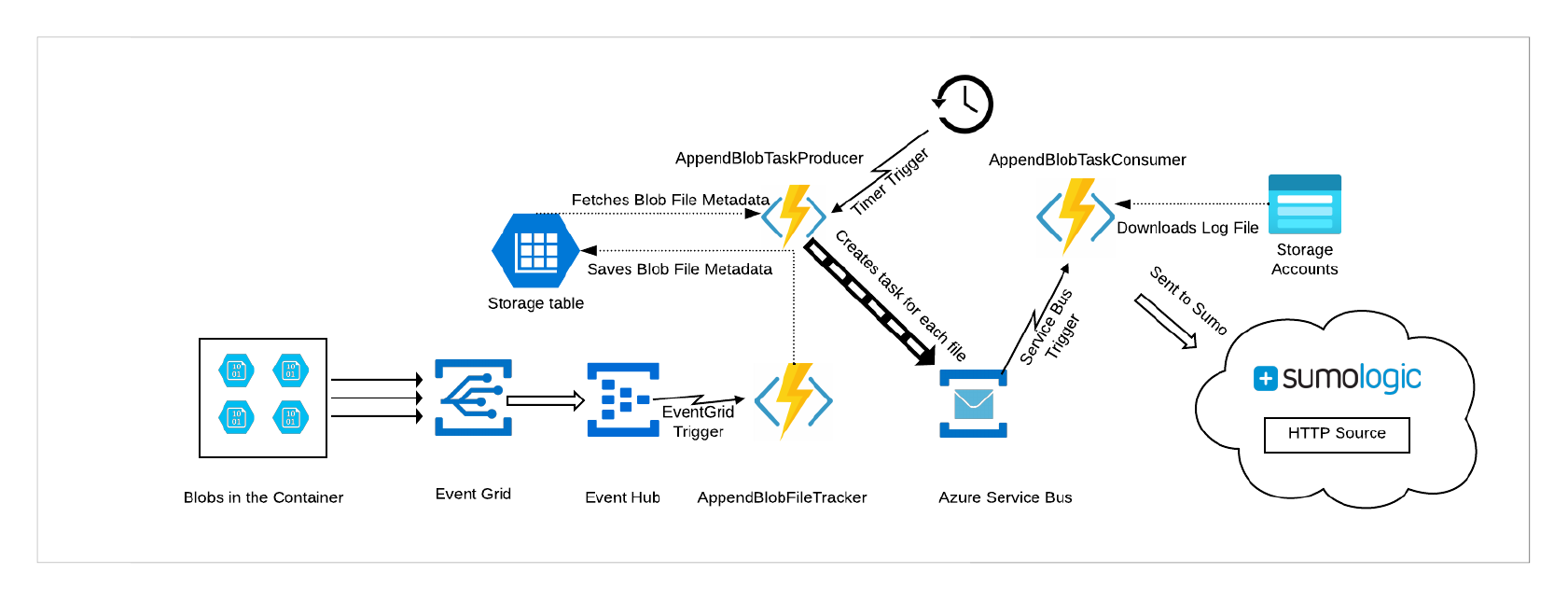
Currently ARM template is integrated with github and for each functions build folder is present in AppendBlobReader/target directory
- AppendBlobReader/target/producer_build/AppendBlobFileTracker - Function for Creating file metadata in file
FileOffsetMaptable in storage account. - AppendBlobReader/target/consumer_build/AppendBlobTaskConsumer - Function for Downloading Append blobs and ingesting to SumoLogic
- AppendBlobReader/target/appendblob_producer_build/AppendBlobTaskProducer - Function for periodically polling
FileOffsetMaptable and creating tasks in Service Bus to be consumed by consumer function
Make all the code changes in AppendBlobReader/src directory, once all the changes are completed, run below command to update target directory.
npm run build
This command copies required files in AppendBlobReader/target directory
Integration tests are in AppendBlobReader/tests folder and unit tests are in sumo-function-utils/tests folder.
A shared service principal is available for the team via 1Password in the "App Content team" vault. Use the credentials from there to configure run_integration_test.sh.
| Role | Scope | Purpose |
|---|---|---|
| Contributor | Subscription | Create/deploy resource groups, function apps, storage, Event Hub, Service Bus |
| User Access Administrator | sumo-appendblob-integration-test-do-not-delete |
Assign Storage Blob Data Reader role to function app managed identity |
How to set up permissions:
- Raise a helpdesk ticket to assign User Access Administrator scoped to the resource group
sumo-appendblob-integration-test-do-not-delete(one-time request). - Once the SP has User Access Administrator, it can self-assign Contributor at subscription level:
az role assignment create \
  --assignee <service-principal-app-id> \
  --role "Contributor" \
  --scope /subscriptions/<subscription-id>
The resource group sumo-appendblob-integration-test-do-not-delete must exist and the SP must have User Access Administrator scoped to it. This resource group persists across test runs — do not delete it.
az group create -n sumo-appendblob-integration-test-do-not-delete -l centralus

az role assignment create \
  --assignee <service-principal-app-id> \
  --role "User Access Administrator" \
--scope /subscriptions/<subscription-id>/resourceGroups/sumo-appendblob-integration-test-do-not-deleteModify the run_integration_test.sh file with below parameters:
AZURE_SUBSCRIPTION_ID=`<Your azure subscription id, refer https://learn.microsoft.com/en-us/azure/azure-portal/get-subscription-tenant-id#find-your-azure-subscription>`
AZURE_CLIENT_ID=`<Your application id, refer https://learn.microsoft.com/en-us/entra/identity-platform/quickstart-register-app#register-an-application>`
AZURE_CLIENT_SECRET=`<Generate client secret, refer https://learn.microsoft.com/en-us/entra/identity-platform/quickstart-register-app#add-credentials>`
AZURE_TENANT_ID=`<Your tenant id, refer https://learn.microsoft.com/en-us/azure/azure-portal/get-subscription-tenant-id#find-your-microsoft-entra-tenant>`
AZURE_DEFAULT_REGION=`eastus`
SUMO_ACCESS_ID=`<Generate access key https://help.sumologic.com/docs/manage/security/access-keys/#create-your-access-key>`
SUMO_ACCESS_KEY=`<Generate access key https://help.sumologic.com/docs/manage/security/access-keys/#create-your-access-key>`
SUMO_DEPLOYMENT=`<One of: au, ca, de, eu, fed, in, jp, us1, us2. Refer https://help.sumologic.com/APIs/General-API-Information/Sumo-Logic-Endpoints-and-Firewall-Security>`
TEST_STORAGE_RESOURCE_GROUP=`sumo-appendblob-integration-test-do-not-delete`cd AppendBlobReader/tests
source .venv/bin/activate
source run_integration_test.shTo run unit tests, first install test dependencies and then run the tests using below commands
npm install
npm test
package-lock.json can be created using below command
npm install --package-lock
Fix the security dependencies by running below command
npm audit fix