A VSCode extension designed for large project development, providing local comment and bookmark functionality that allows you to add Markdown technical notes without modifying source code.
You might not need it now, but when you face overwhelming amounts of code, I hope you'll remember it.
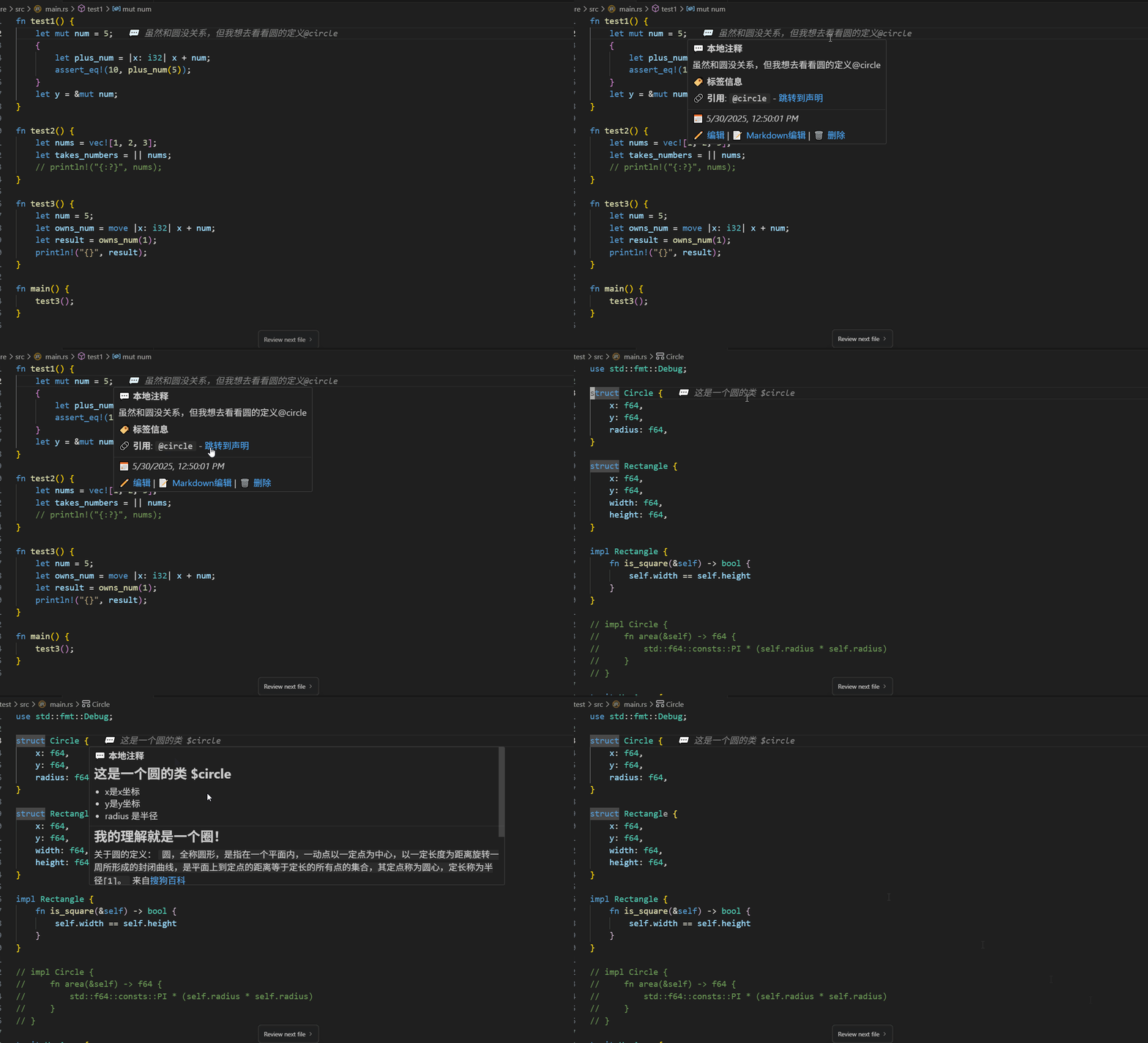
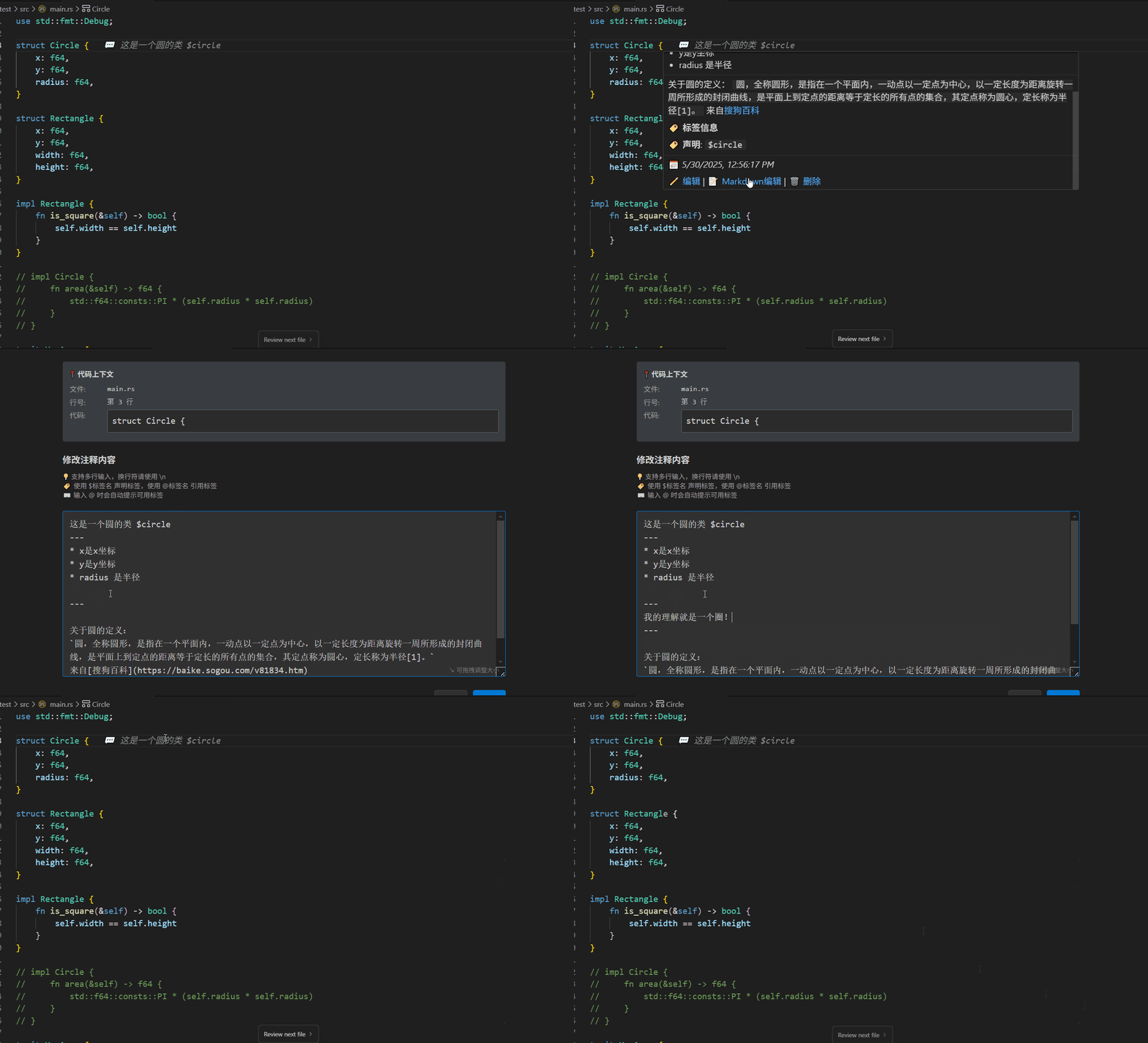
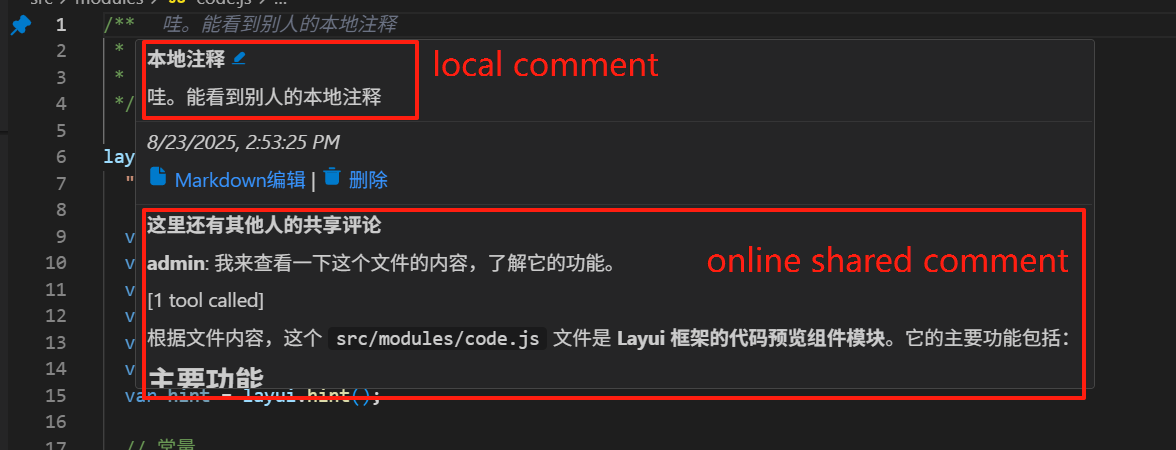
Display other users' (here admin user) comment information in the editor. You can see others' evaluations of code segments like reading WeChat Books:
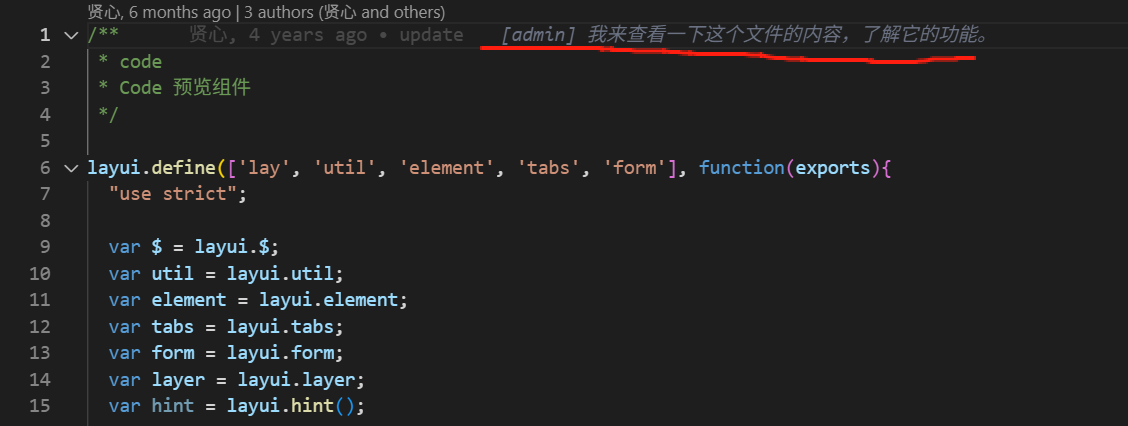
Distinguish between users' local comment information and online shared information from others:
Manage your shared comments in the web interface:
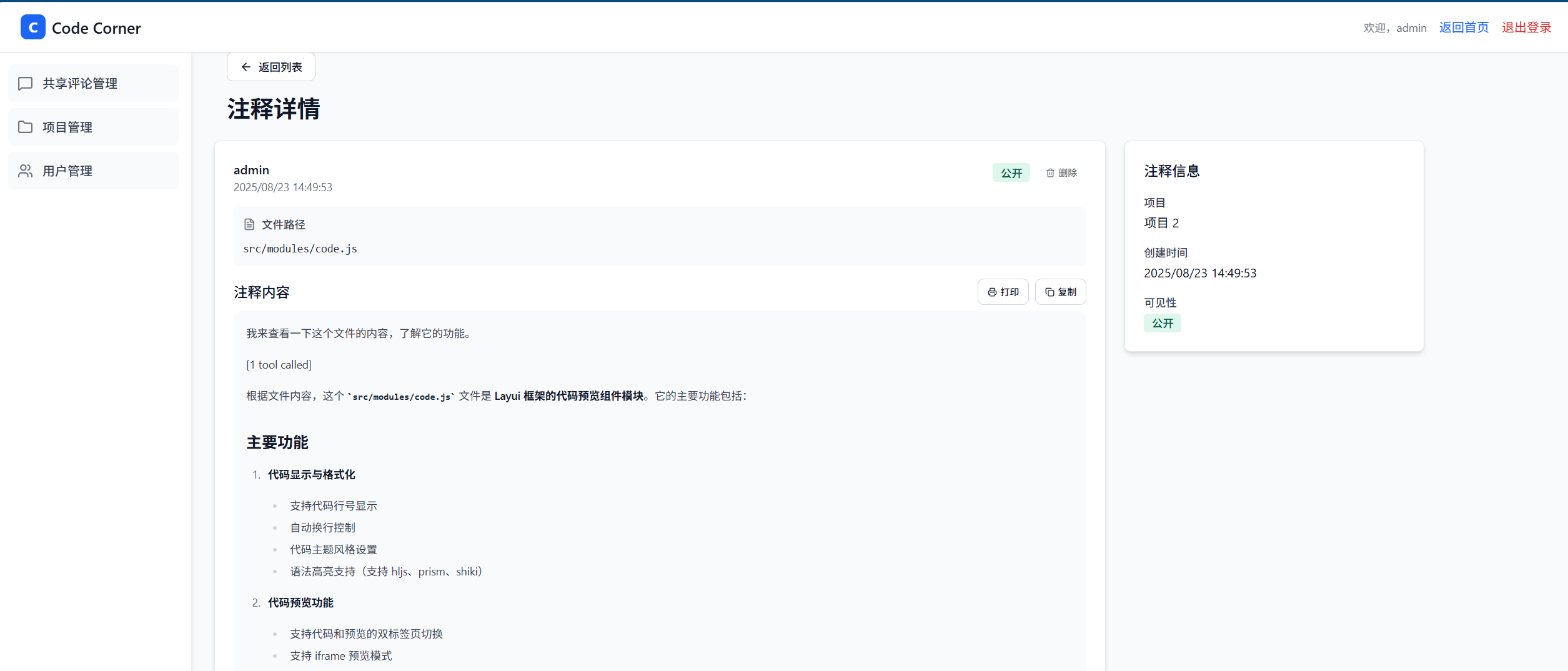
Note: The multi-user collaboration version is not currently available for free public use.
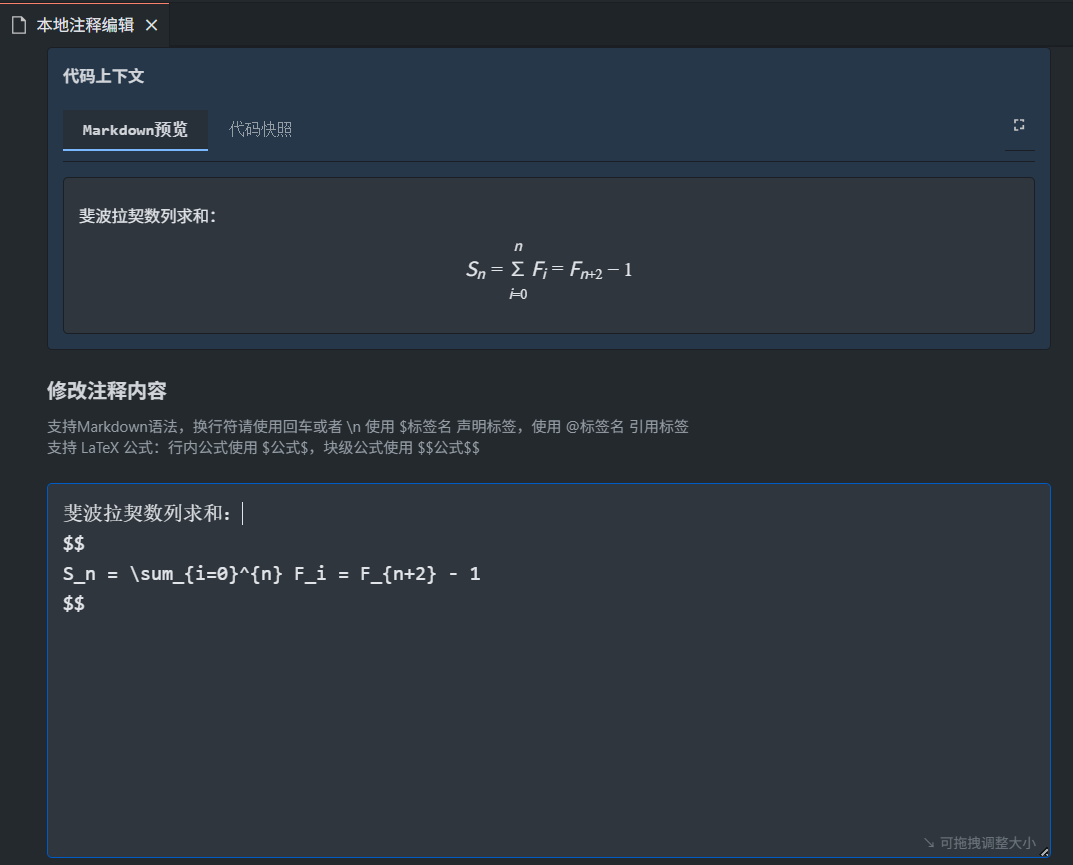
Now, latex formulas can be added in local comments!
In daily development, we often encounter scenarios like:
- Project Research: Need to mark key code segments and record analysis thoughts
- Development Thinking: Want to record design ideas and personal understanding, but these thoughts aren't suitable for version control
- Problem Fixing: For some problem fixes, want to record the related solution process
- Code Association: Need to mark cross-file code relationships and establish personal logical connections
- Learning Others' Code: Want to add learning comprehension notes without modifying original files
- AI Assistance: AI-written or analyzed code has scattered knowledge points, hope to have a place to save records
- ❌ Code Comments: Will pollute source code and affect code cleanliness
- ❌ External Documentation: This is our most commonly used solution, but it also has the most problems. Good ones don't support markdown, markdown-supporting ones don't support multi-point login, multi-point login ones don't have mermaid diagram rendering, and those with everything require payment.
Completely Independent: Comment data is completely separated from source code, not affecting original files
Project Isolation: Each project stores independently without interference
Persistent Storage: Maintains across sessions, still exists after restarting VSCode
Smart Tracking: Automatically adjusts comment positions when code changes
Rich Text Support: Supports Markdown syntax for richer content
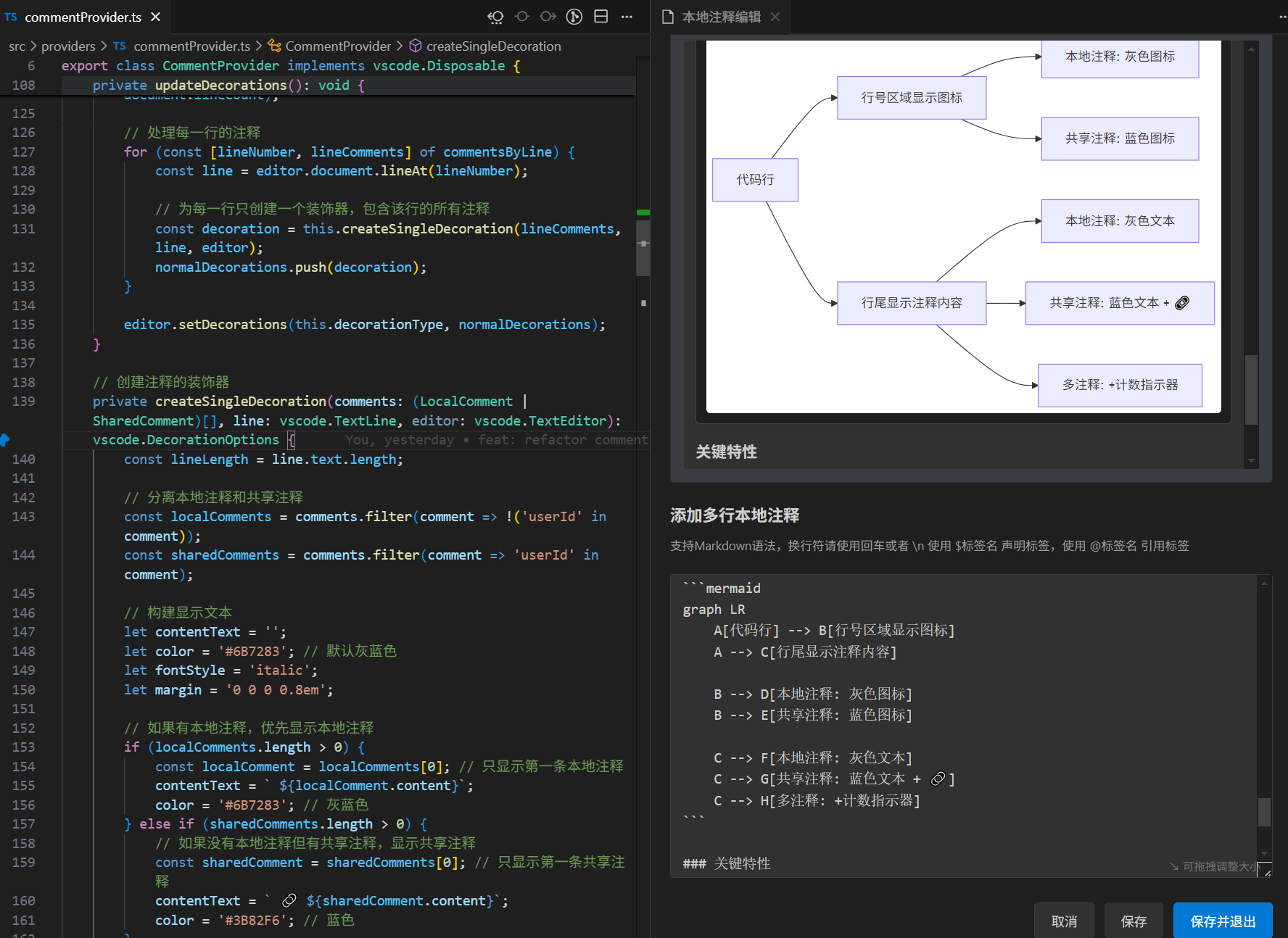
Mermaid Flowchart Support: Supports Mermaid flowcharts, better helping to understand code
Personal Exclusive: Completely localized, comment content completely private
Multi-user Collaboration: Previous generations plant trees, future generations enjoy the shade. Users' completed code analysis and functional understanding can be shared with the team, everyone can enjoy the learning results.
- Quick Add:
Ctrl+Shift+CAdd comment at current line (functionality is somewhat redundant, will consider removing in future versions) - Markdown Support:
Ctrl+Shift+MCreate Markdown local comment - Instant Edit:
Ctrl+Shift+EQuickly edit current line comment - Convenient Delete:
Ctrl+Shift+DDelete current line comment
- One-click Toggle:
Ctrl+Alt+KQuickly add or remove bookmark - Visual Display: Shows bookmark icons in editor sidebar
- Scrollbar Marking: Shows bookmark position markers on scrollbar
- Hover Information: Mouse hover displays bookmark detailed information
- Sequential Navigation:
Ctrl+Alt+JJump to next bookmark - Reverse Navigation:
Ctrl+Alt+Shift+JJump to previous bookmark - Cross-file Support: Navigate bookmarks across entire project
- Circular Jump: Automatically returns to first after reaching last bookmark
Local comments are best applied on the same line as function declarations. For example:
function test { // local comment is best placed on this line
  test code
}
This reduces the problem of local comments not matching code positions after switching branches or making large-scale code modifications. Please do not add local comments on empty lines or meaningless code lines.
| Shortcut | Function | Description |
|---|---|---|
Ctrl+Shift+C |
Add Local Comment | Add simple comment at current line |
Ctrl+Shift+M |
Add Markdown Comment | Open multi-line editor for rich text comments, core shortcut, just remember this one |
Ctrl+Shift+E |
Edit Comment | Quickly edit current line comment |
Ctrl+Shift+D |
Delete Comment | Delete current line comment |
Ctrl+Shift+T |
Select Convert | Convert selected text to comment |
| Shortcut | Function | Description |
|---|---|---|
Ctrl+Alt+K |
Toggle Bookmark | Add or remove bookmark at current line |
Ctrl+Alt+J |
Next Bookmark | Jump to next bookmark position |
Ctrl+Alt+Shift+J |
Previous Bookmark | Jump to previous bookmark position |
- Add First Comment: Press
Ctrl+Shift+Mon a code line - Add First Bookmark: Press
Ctrl+Alt+Kon a code line - View Sidebar: Find "Local Comments" panel in resource explorer
- Try Tag Function: Use
$tagNameand@tagNamein comments
let userConfig = {};  // local comment: This is where $userConfig is declared

function loadConfig() {// local comment: This loads @userConfig configuration
    userConfig = JSON.parse(localStorage.getItem('config'));
}Q: Will comment data be committed to version control? A: No. Comment data is stored locally and won't affect source code files.
Q: Will comments be lost after switching branches? A: No. Comment data is independent of Git branches, switching branches won't affect comments.
Q: How to backup comment data? A: You can export backup through the "Export Comment Data" function in the command palette.
Q: Can others see my comments? A: No. Comment data is only stored locally, completely private, and won't be seen by others.
- Base Directory:
- Windows:
%APPDATA%/Code/User/globalStorage/vscode-local-comment/projects/ - macOS:
~/Library/Application Support/Code/User/globalStorage/vscode-local-comment/projects/ - Linux:
~/.config/Code/User/globalStorage/vscode-local-comment/projects/
- Windows:
Each project has its own storage file, named: [Project Name]-[Hash Value].json
For example:
my-project-a1b2c3d4e5f6.json
another-project-g7h8i9j0k1l2.json
- Comment data is stored locally by project
- Won't be committed to version control system
- Supports manual backup and restore
- Persists across VSCode sessions
- Each project maintains independent comment database
If you encounter problems during use, please provide feedback through:
- GitHub Issues: Project Address
- Email Contact: sangliang_sa@qq.com
- ✨ adds support for latex formulas!!
- ✨ allows log information to be output in the output of the editor
- 🔨 optimized the code, slightly improving performance in rendering
- Fixed the issue where an error occurred when cleaning bookmarks for the current fileWhen there are no shared comments, unlogged-in users do not need pop-up prompts
- Remove some useless code
- The issue of being unable to normally save and exit when entering Markdown editing from a mouse click
- Some other optimizations
- ✨ Biggest highlight: Support for multi-user collaboration, allowing users to share local comments to the cloud and pull local comments from the cloud
- ✨ Optimize mermaid diagrams, allowing ctrl+mouse wheel to zoom flowcharts
- ✨ Add mermaid diagram hand-drawn mode
- ✨ Support preview of shared comments
- ✨ Allow users to directly import contributed comments into local comments
- ✨ Allow users to click context content in markdown editor to switch comment line numbers
- 🔨 Fix some known issues
- 🎉 Additional note: Although this version already supports multi-user comments, I don't have a cloud server yet, so it can't be tested for now
- ✨ Support for mermaid flowcharts, now users can freely use mermaid syntax in markdown comments
- 🔨 Fix some known issues
- 🎉 Additional note: In this release, many features about multi-user collaborative comment content have actually been implemented, but still need some time to polish the functionality. This is just a preview of the next major version's features
- ✨ Support using ctrl+s to save text while editing Markdown
- ✨ Add clear all bookmarks in all files functionality to local comment commands
- 🔨 Fix icon style display issues on Linux platforms
- 🔨 Fix some known issues
- ✨ Optimize Markdown preview position, using tab selection box style
- 🔨 Fix issue where @ tag autocomplete position appears incorrectly and doesn't display when markdown has too many lines
- 🔨 Other issues
- ✨ Add bookmark functionality, use ctrl+alt+k to add bookmarks, use ctrl+alt+j to jump to next bookmark position
- ✨ For unmatched code, can also see initial snapshot content in markdown editor
- 🔨 Fix some known issues
- ✨ Add user manual matching of comments to code functionality
- ✨ File items in local comment panel are sorted by user usage frequency
- ✨ Add jump to file functionality for file items in local comment panel, can serve as auxiliary file tab jumping
- 🔨 Fix some known issues
- ✨ When using markdown editor, will display in split screen
- ✨ User data import and export functionality, more flexible options (import/export by project path, import/export by comment content)
- ✨ When using markdown editor, context content hints are increased
- 🔨 Fix some known issues
- 🔨 Use stricter matching algorithm, fix issue where comments don't match code positions after large code block changes
- ✨ Remove some useless commands from command line panel
- 🔨 Other issues
- ✨ Add markdown edit preview functionality
- ✨ Add multi-language support for operation commands
- 🔨 Fix issue where comment styles are incorrect in comment tree after switching branches
- ✨ Local comments not found in comment tree panel will display in darker colors
- ✨ When switching git branches, incorrectly executed code for updating comment code snapshots, causing comment position confusion. This issue has now been fixed
- 🎉 Add new shortcut ctrl+shift+m allowing direct entry into markdown mode for adding and modifying local comments
- 🔨 Fix issue where cursor focus is lost when returning to code editor after completing editing in markdown editor
- 🔨 Fix issue where different projects use the same local comment storage file
- 🎯 Other known errors
- 🔨 Fix issue where comment positions are incorrect after switching branches
- 💻 Fix issue where smart completion positions are incorrect during Markdown editing
- ✨ Convert Selected Text to Comment: Right-click selected text can directly convert to local comment and delete original text
- 📝 Multi-line Editor: New professional multi-line comment editing interface with rich editing features
- 🎨 Dual Edit Mode:
- Quick Mode: Single-line quick editing
- Detailed Mode: Multi-line rich text editing
- ⌨️ Enhanced Shortcuts:
- Ctrl+Enter: Save editing
- 🏷️ Improved Tag Completion: Automatically display tag dropdown when typing @ in editor
- 🖱️ Hover Action Buttons:
- ✏️ Edit: Quick single-line editing
- 📝 Markdown Edit: Multi-line detailed editing
- 🗑️ Delete: Delete comment
- Select code that needs marking
- Right-click and choose "Convert to Local Comment"
- Selected code becomes comment, original code automatically deleted
- Hover over comment
- Click "📝 Markdown Edit"
- Write detailed explanation in multi-line editor
- Support line breaks (\n) and tag references
- ✨ Local comment functionality: Add local comments in code without modifying original files
- 🏷️ Tag system: Support
$tagNamedeclaration and@tagNamereference - 🔗 Smart navigation: Click tag references to jump to declaration positions
- 💡 Auto-completion: Automatically suggest available tags when typing
@ - 🌲 Tree view: View all comments in sidebar
- ⌨️ Shortcut support: Ctrl+Shift+C to add comments
- 🎨 Syntax highlighting: Tags highlighted in comments
- 📁 Cross-file support: Tags can be referenced across different files
MIT License