





This tutorial contains 45 auto-graded Python exercises about lists, loops, dictionaries and matrices, plus a welcome page, all inside one LearnPack package. Every exercise folder ships an app.py, a test.py and a reference solution.hide.py, and the whole package is graded by 131 individual pytest checks. Estimated duration: 10 hours, difficulty easy, Python 3. Instructions are available in English and Spanish, and 13 exercises include a video walkthrough.
- Difficulty: easy (beginner, no previous loop experience needed)
- Estimated duration: 10 hours
- Technologies: Python 3, pytest, LearnPack
- Exercises: 45 auto-graded exercises + 1 welcome page
- Automatic grading: yes — 131 pytest checks across 45
test.pyfiles - Video solutions: 13 exercises embed a YouTube walkthrough
- Languages: instructions in English and Spanish (
README.mdandREADME.es.mdinside every exercise)
- Access and mutate lists by index, where the first position is
0: read the 3rd item withmy_list[2], replace a value, and print a specific position. - All the ways of looping in Python:
for item in my_list,for i in range(start, stop, step)andwhile, including a countdown from20to1that ends withLIFTOFF. - Accumulator patterns written by hand: totals, averages, maximums and minimums built with a
forloop and an auxiliary variable instead ofsum()ormax(). - Transform lists with
map()across 7 exercises: converting Celsius to Fahrenheit, mapping a list with an already-defined function, printing the data type of every item withtype(), and mapping a list of dictionaries. - Remove elements with
filter()across 5 exercises: numbers greater than10, names that start with a given letter, completed tasks inside a list of dictionaries, and a final one that combinesfilter()withmap()to build<li>HTML tags. - Work with dictionaries: read and add keys, loop over keys and values, and count letter frequencies ignoring case and spaces.
- Build and read 2-dimensional lists (matrices): generate an N×N matrix of
1s and analyse a parking-lot grid with a nested loop.
The 45 exercises are small, self-contained programs that grow in difficulty. Some of the ones you will solve:
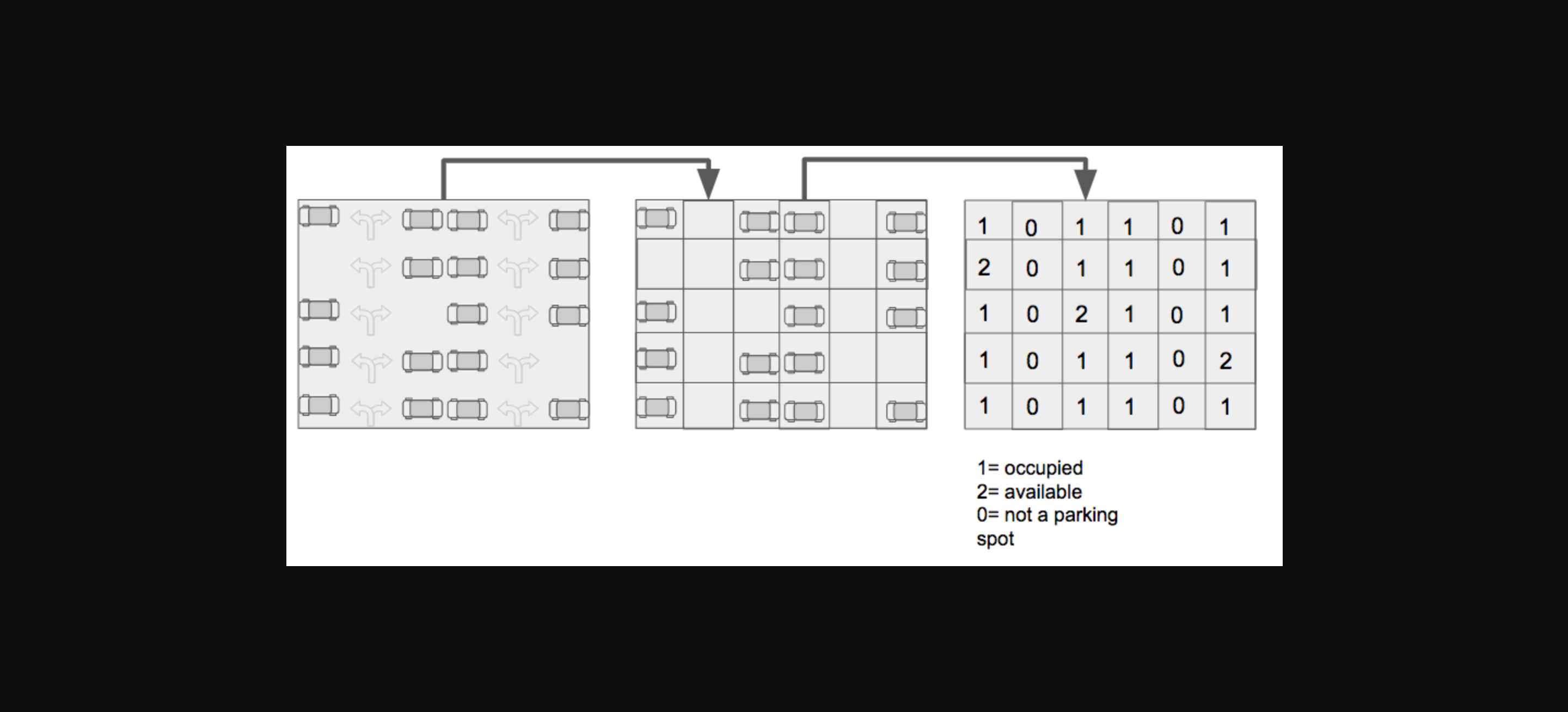
03Flip list — turn[45, 67, 87, 23, 5, 32, 60]into[60, 32, 5, 23, 87, 67, 45]by looping the list and appending each item into a new one.07Do While — print every number from20down to1with awhileloop, adding an exclamation mark to multiples of 5, and finish withLIFTOFF.08.2Divide and conquer — asort_odd_even()function that returns one single flat list with the odd numbers first and the even ones after.09Max integer — amax_integer()function that receives a list and returns the biggest number using aforloop and anif.12Map a list — convert a list of Celsius temperatures into[28.4, 93.2, 132.8, 14.0]inside amap()call.13.4Making HTML with filter and map — combine both functions to output['<li>Red</li>', '<li>Orange</li>', '<li>Pink</li>', '<li>Violet</li>'].14.1Letter counter — count how many times each letter appears in a text and print a dictionary such as{'h': 1, 'e': 1, 'l': 3, 'o': 2, ...}.15.2Parking lot — aget_parking_lot()function that receives a matrix and returnstotal_slots,available_slotsandoccupied_slots.16Techno Beats — the final challenge: alyrics_generator()function that turns[0, 0, 1, 1, 1, 0]intoBoomandDrop the bassbeats, adding!!!Break the bass!!!every time it finds three1s in a row.
- Python basics: variables,
print(),if/elseand how to declare a function. If you have never written Python, start with Learn Python Interactively (beginner) first. - No installation if you open the tutorial in GitHub Codespaces or Gitpod: the container already installs Python 3.10, LearnPack and pytest for you (the Codespaces dev container also adds Node.js 22).
- For a local setup: Python 3, Node.js 14+ and npm, so you can install LearnPack and run
learnpack start. - Zero previous knowledge of loops: exercise
01is a plainprint("Hello World")and the difficulty ramps up from there.
Each of the 45 exercises has a test.py file executed with pytest (version 6.2.5, with pytest-testdox for readable output). Together they contain 131 named checks, and they grade your work in three different ways:
- Console output: 40 exercises capture what your program prints and compare it against the expected text, character by character, including line breaks.
- Function behaviour: 9 exercises require a function with an exact name, and 4 of them (
09,12.6,15.1and15.2) call that function with their own inputs and compare the returned value, so printing instead of returning is not enough. - Source code inspection: 39 exercises open your
app.pyand scan its text (some with a regular expression, some with a plain search) to make sure you actually used the construct being taught —for,while,if,print,map,filter,typeorimport random, depending on the exercise.
Every exercise folder also contains solution.hide.py with a reference solution, so you can compare approaches once you have solved it yourself.
💡 The tests are deliberately strict about output formatting. If your logic is right but a test still fails, compare your output with the "Expected result" block in the exercise instructions, space by space.
- Printing when the test expects a
return. In16Techno Beats the last lines ofapp.pyalready callprint(lyrics_generator([0,0,1,1,0,0,0])), so your function must return the string. If you print inside the function, the output is duplicated and the test fails. - Ignoring the function parameter. The
15.2Parking lot test callsget_parking_lot()with its own matrices, not with the globalparking_statevariable. A function that reads the global list instead of its argument fails the second and third checks. - Miscounting the parking-lot values. In
15.2a0is not a parking slot: only1(occupied) and2(available) count towardstotal_slots. For[[1,1,1], [0,0,0], [1,1,2]]the expected answer is{'total_slots': 6, 'available_slots': 1, 'occupied_slots': 5}. - Replacing
map()orfilter()with a list comprehension. The 12.x tests literally search for the textmapinside yourapp.py, and the 13.x tests search forfilter, so a comprehension that prints the right result is not enough. The same happens withsum()in05ormax()in09: those tests require aforloop in your code. - Leaving debugging
print()calls behind. In05Sum all items and13.4the test compares the entire console output with the expected string, so any extra line breaks the assertion. - Printing the
map()orfilter()object instead of the list. Wrap the result inlist(); the expected output looks like[23, 12, 35, 54, 21, 534, 23, 42], not<filter object at 0x...>. - Off-by-one indexes. Lists start at
0, so the "3rd item" ismy_list[2]andthursdayin a week list lives atmy_list[4]. Exercise01.1importsmy_listfrom your file and asserts that position 4 isNone, so do not rename or delete the variables that come predefined inapp.py.
No. Opening the repository in GitHub Codespaces or Gitpod builds a container with Python 3.10, LearnPack and pytest already installed, and the exercises start on their own. Installing locally is optional and takes two commands.
You need the very basics: variables, print(), if/else and function declarations. Lists, indexes, loops, map(), filter(), dictionaries and matrices are all explained from scratch inside the exercise instructions.
The package is estimated at 10 hours of work. The first exercises take a couple of minutes each, while the final ones (15.2 Parking lot and 16 Techno Beats) require nested loops and auxiliary counters and can take considerably longer.
Not if you want the tests to pass. The seven map() exercises and the five filter() exercises inspect your source code and look for the corresponding function inside app.py. Once you have passed them, rewriting the solution as a comprehension is an excellent extra practice.
Because the assertions compare exact strings. A missing trailing space, a different number of decimals, single quotes instead of double quotes inside a printed list, or an extra debugging line are enough to fail. Copy the "Expected result" block from the instructions and compare it literally with your output.
Access to the exercises costs nothing and the solutions you write are yours to keep and reuse. The tutorial content itself is not open source: the LICENSE reserves all intellectual property rights and does not allow republishing, selling or redistributing the material.
- Learn Python Interactively (beginner) — the recommended step before this one.
- Learn Python Functions Interactively — parameters, return values and scope.
- Learn Object Oriented Programming with Python — classes and objects.
- Master Python by practice (interactive) — a bigger challenge once loops feel natural.
The fastest way is to open the repository in a ready-made cloud environment:
-
Click Open in Codespaces (recommended) or Open in Gitpod.
-
Wait for the container to finish building. It installs Python 3.10,
pytest, LearnPack and the LearnPack Python plugin (in Codespaces it also installs Node.js 22). -
The LearnPack exercises should open automatically. If they do not, run this in the terminal:
$ learnpack start
There is also an intro video for the whole tutorial: Python lists and loops introduction.
-
Install LearnPack and its Python plugin (you need Node.js 14+ and Python 3):
$ npm i @learnpack/learnpack@5.0.348 -g && learnpack plugins:install @learnpack/python@1.0.6 -
Clone this repository and enter the folder:
$ git clone https://github.com/4GeeksAcademy/python-lists-loops-programming-exercises.git $ cd python-lists-loops-programming-exercises -
Install the testing dependencies and start the tutorial from the same folder that contains
learn.json:$ pip3 install pytest==6.2.5 pytest-testdox mock $ learnpack start
Every exercise lives in its own folder inside exercises/ and contains the same set of files:
-
app.py— the file you edit; it is the Python script that gets executed. -
README.mdandREADME.es.md— the instructions in English and Spanish, sometimes with a linked video tutorial. -
test.py— the grading script. You do not need to open it, but reading it tells you exactly what is being checked. -
solution.hide.py— the reference solution for that exercise.
Found a bug or a typo? Report it here; these exercises are built collaboratively and every report helps.
Thanks to these wonderful people (emoji key):
-
Alejandro Sánchez (alesanchezr) — (coder) 💻, (idea) 🤔, (build-tests)
⚠️ , (pull-request-review) 👀, (build-tutorial) ✅, (documentation) 📖 -
Paolo (plucodev) — (bug reports) 🐛, (coder) 💻, (translation) 🌎
See the full list of contributors. This project follows the all-contributors specification; contributions of any kind are welcome.
This and many other exercises are built by students as part of the 4Geeks Academy coding bootcamp. Learn more about the Full Stack Developer career program and the Data Science and Machine Learning career program.