Nicobon [CC BY-SA 4.0 (https://creativecommons.org/licenses/by-sa/4.0)]
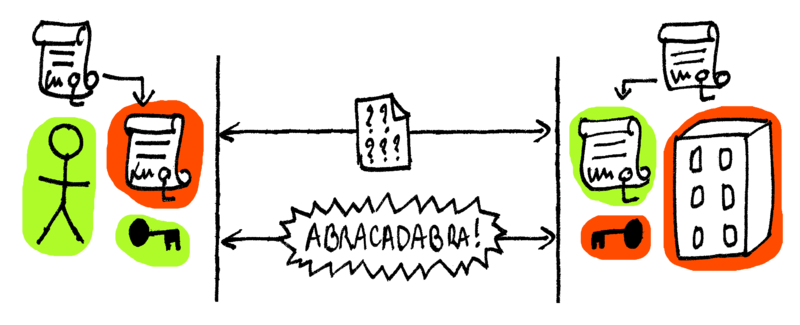

A better and more complete example of Mutual TLS authentication in NodeJS for HTTPS, WebSockets and gRPC
- Server and Clients in HTTP1/HTTP2, WebSockets and gRPC
- Certificate generation using
OpenSSLorForge - Documentation for clients (Windows, Linux, OSX, Android)
- Docker image for testing
- No library bloat
Install
npm install
Generate Certificates and Private Keys
# Interactive
npm run generate:keys-openssl

# Automatic (Primarily for testing)
npm run generate:keys-forge
Connect
npm run start:server

# Connect to the above locally via HTTP2
npm run start:client2

# Connect via WebSockets
npm run start:clientwss
Docker image:
docker pull ghcr.io/benedridge/mutual-tls/mutual-tls:latest
docker run --name mutual_tls -p 127.0.0.1:8443:8443 -d ghcr.io/benedridge/mutual-tls/mutual-tls:latest
The generator scripts will create certificates and private keys in the keys directory as follows
-
Certificates:
- CA.crt
- CLIENT.crt
- SERVER.crt
-
Private Keys (DO NO EXPOSE OR USE IN PROD):
- CA_key.pem
- CLIENT_key.pem
- SERVER_key.pem
These certificates and keys need to be imported and loaded into the browser/OS keychains:
Browse to: localhost:8443 and you should be requested to supply a certificate or should connect automatically if the CA and Client certificates have been imported to your browser/OS.
OSX typically requires the relevant keys to be imported into the keychain:
See security --help for additional options
security import CA.crt -k ~/Library/Keychains/login.keychain

security import CLIENT.crt -k ~/Library/Keychains/login.keychain
security import CLIENT_key.pem -k ~/Library/Keychains/login.keychain

security import SERVER.crt -k ~/Library/Keychains/login.keychain
Safari and Chrome should work once keys have been trusted and key preferences set to hostname.
Firefox has it's own keystore that doesn't like PEM formatted keys and prefers p12 format.
So you will need to import the CLIENT.p12 file using the password from the generator output in the console.
See below:
about:preferences#privacy then view certificates
CA import for Ubuntu
- Rename
CA.crtand copy to/usr/local/share/ca-certificates/ chmod 644 CA.cr- Run
sudo update-ca-certificates
- Transfer the
CA.crtandCLIENT.p12file to your device - Settings -> Security -> Device Administrator and Credentials -> Install from SD card etc.
certutil -enterprise -f -v -AddStore "Root" <Cert File path>
See: https://docs.microsoft.com/en-us/windows-server/administration/windows-commands/certutil
- https://intown.biz/2016/11/22/node-client-auth/
- https://engineering.circle.com/https-authorized-certs-with-node-js-315e548354a2
- https://gist.github.com/pcan/e384fcad2a83e3ce20f9a4c33f4a13ae
Social media image: Nicobon [CC BY-SA 4.0 (https://creativecommons.org/licenses/by-sa/4.0)]